Daylight Again – An all Analog Radio
What’s all this?

In 10 seconds, 

  • A high performance, 7MHz, 5 watt SSB rig
  • Draws just 24 mA of current
  • 90 dB dynamic range, 80 dB close-in dynamic range
  • 3D printed rock stable, slow tuning PTO with zero backlash.
  • 3D printed toroids
  • You have all the parts in the junk box or you can buy them tonight at the vendor night.
  • Very stable, slow tuning VFO with no backlash
  • Costs less than 20 dollars to build, even in new parts. 


The Circuit Diagram

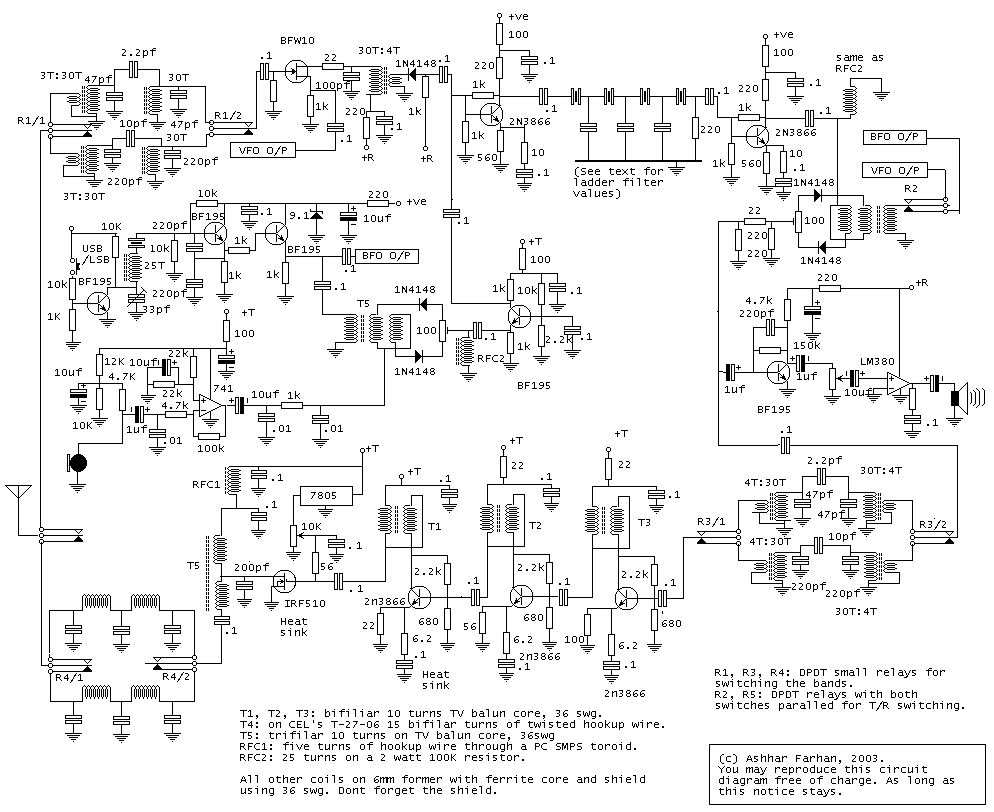
Full Circuit Diagram

Download the circuit diagram in PDF | Download 3 D print files of the PTO

Isn’t analog radio an anachronism? Are we just being nostalgic? What’s wrong with the Si5351?

Last year, when we had to isolate ourselves for a week, I managed to grab some components, an Antuino (the RF lab in the box), some basic tools and set about making a slightly souped up version of Roy Lewallen’s Optimized Transceiver from our room. The experience of a well designed analog rig was truly enlightening. There were no spurs, the audio was crystal clear and with presence. 

When David NM0S and I were discussing this year’s FDIM, I suggested that we do a return to analog radios and he jumped at it! So here we are, talking analog radios in 2022. 

Here is the memo : The analog never died. The world is analog all the way, until you descend into Quantum madness. The antennas are analog, Maxwell died a content, analog man. Our radios, ultimately, are analog machines and we are all analog beasts too. Amateur Radio technology has evolved into the digital domain. However,  it has only made it easier for us to do analog with computers to simulate and print our circuits. 

So, it’s time to bid good bye to our Arduinos and Raspberry Pis and build an Analog Radio for ourselves. So let’s see what we can achieve in hindsight, a return to our native land and a rethink of our approaches.

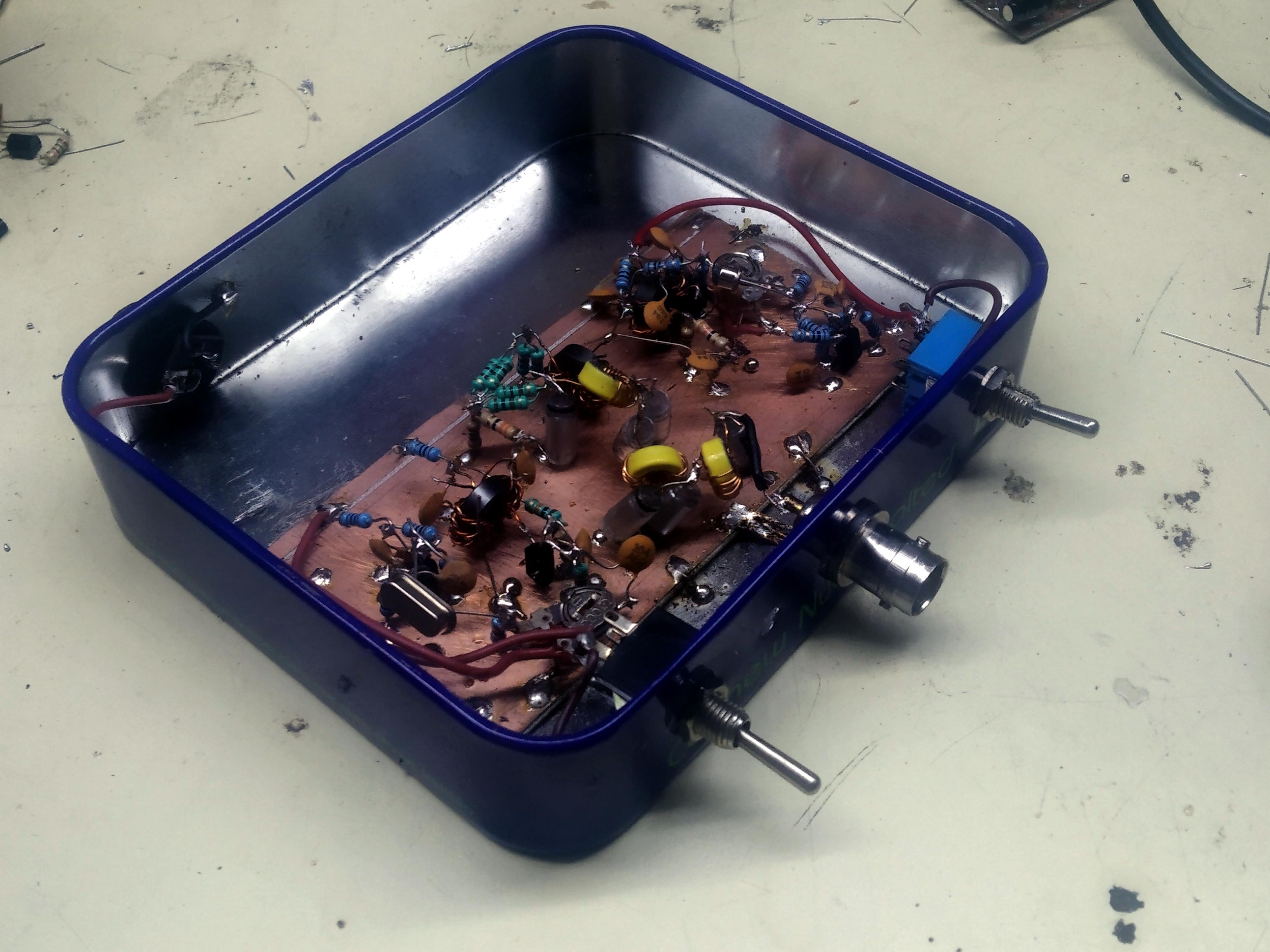
The radio is called Daylight Again, a nod to being back at the FDIM in 2022 after a gap of two years. It is named after the Crosby, Stills, Nash and Young’s song that had been humming all the time while put this radio together, emerging after 2 years of lockdown.  This radio that took two days to come together, no actually two years! That’s: parts of it got built and stowed away, thoughts were struck in the shower, questions popped up during early morning cycle rides and notes and circuits were scribbled in the notebook. 

I must take the first of many diversion here: I hope you all maintain a notebook. Write down the date and whatever you thought or did on the bench and the result. Nothing is trivial enough to leave out. Wisdom comes to those who write notes. 

I started to build this on Saturday the 14th May and I checked into the local SSB net on Monday morning, the 16th May 2022.

Back to the radio.  What can an analog radio do that will appeal to us homebrewers? 

    • Simple to build (?) This is a myth as this paper will demonstrate. It may be easy to duplicate a design from the QRP Journal or the Sprat, but to design a radio that is stable, sensitive, selective and sounds sweet on air is not trivial. It needs thinking and revisiting our assumptions and habits (like the diode mixers).
    • Low power: The radio draws just 24 mAYes, an analog radio can be really really lean. Low power is not just a show-off. It has some real purpose. One can work for weeks from a single pack of AA cells. Working your rig off a battery pack eliminates a large species of noise and spurs; As things stay cool inside, the VFO drift is much lower and one could carry the rig on a cycle!
    • Low noise VFO.What’s the big deal here? All local oscillators are the same, isn’t it? Not really. Consider each VFO to be an AM transmitter that splatters around the carrier. As the VFO splatter mixes with an incoming signal that is strong and yet off your receiver frequency, to the listener it appears as if the signal has splatter. Actually, the signal would be entirely clean, it is your own local oscillator’s splatter that you are hearing.
    • Having clean VFO  is the most important way of increasing the dynamic range of your radio. A free running JEFT VFO that has sufficient power and a good Q components, will be unmatched by any synthesized or direct sampling radios. The math is all on the side of the free running VFO. We are talking -150 db/Hz at 10 KHz spacing, by comparison the Si5351 is -125 db/Hz, it is 300 times worse.
    • Stability of 2 Hz/15 second. Can it decode FT8? Actually yes, we have had regular decodes after 15 minutes of warm up. It stays stable enough for CW and SSB. WSJT-X suite is the main challenge. We need a stability of better than 2 Hz/15 second period for the WSJT-X suit to work. We do this by keeping the operating frequency of the VFO low, eliminating heat around the VFO and using sturdy but ugly, short and stiff point to point wiring.
    • Dynamic Range of 90 dB and close-in range of 80 dB. The real, tough, beef eating hams don’t care for dynamic range, we operate! Right? Wrong. The bands have changed. Signals tend to cluster within narrow pockets. All the QRPers hang out on 7040, the PSK gang is over at 7060, the FT8 kiddies are parked at 7074. The local charminar net at 7080, long after it is closed, has the hanger-ons late into the noon. We need radios where we can clearly make out a CW pileup where you can hear 20 different stations at once.The 90 dB is actually a very good number. The gains beyond this are marginal. Unless you are operating with full power stations within close neighbourhood on the same band as you, 80 dB of close-in dynamic range is enough to win you CW sweepstakes. Ask Rob Sherwood (https://www.youtube.com/watch?v=GNh0wP9PlsM).
    • Why SSB? Just because it is a more complex thing to build. It is easier to add CW to an SSB rig rather than add SSB to a CW rig. The amplifiers need to be linear, sideband needs to be suppressed etc. We may add CW to this rig later.
    • Undo the Lore.We homebrewers tend to stick to the beaten path. We build exactly the same radios over and over again. When was the last time you didn’t use a diode mixer? Or build radios that didn’t use 50 ohms interconnect? It is about time.

I must warn you there is mathematics ahead. Not too much, but enough to keep you on your toes.

The Daylight radio has a few big ideas that are interesting enough to be tried out. I am leaving out the bad ideas (like varactor tuning and using class E amplification) from the scope of this paper.

The Cascode Mixer
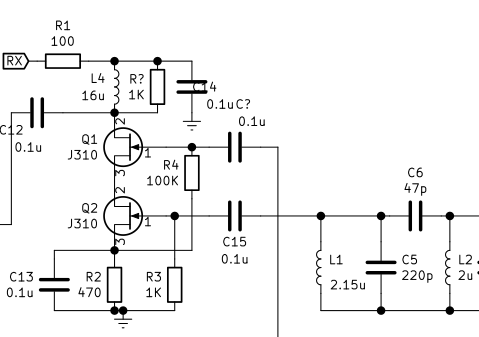
Remember the 70s when Doug, W1FB built those radios with 40673 dual-gate MOSFETs? Well, they are back! It is 2022 and they are exhibiting good dynamic range, we are rebooting the old heros. 

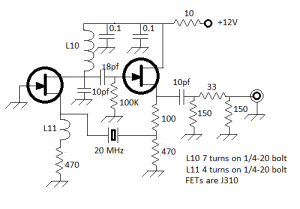
The dual-gate MOSFETs are, surprisingly enough, still being manufactured. Mouser lists tens of thousands of them, they are cheap but available only as SMD parts.  However, you can build a virtual dual-gate FET from two JFETs, it works all the same. A bag of 100 J310s is still sold for a few dollars at Dan’s (. With careful design, a cascode can provide us with +8dbm of input intercept and a gain of 10 db. This might not seem much to most but it is.

This is more than respectable, it is downright awesome. Here is why: The cascode mixer with +8 dBm of Input intercept(IIP3) and with 10 dB gain over it has an OIP3 (output intercept) a huge +18 dbm (calculated as IIP3 + gain).  

In comparison, the diode mixer with +15dbm input intercept has a loss of 7 db and noise figure of 7db (actually the loss is the noise figure). Thus a diode mixer’s output intercept is +8 dBm (again calculated as IIP3 + gain, that is negative loss in this case)  as compared to +18 dBm of the JFET cascode. 

There are several striking things about this mixer:

      1. Take very little VFO power The oscillator injection on Q1 is to the gate, it takes zero power of local oscillator injection (the current never flows into the JFET gate).  This results in the VFO running cooler and with less drift and less current consumption!
      2. Needs no post-mix amplifier This mixer is insensitive to termination and it is unidirectional. The signals will not flow back from the drain to the source. You don’t need to follow this up with a post mixer amplifier that will draw even higher current. Conventionally, a diode mixer needs 5 milliwatts of local oscillator, which means that the oscillator itself must draw about 100 milliwatts to produce it and the diode mixers invariably need a post mix amplifier with about 20 ma of standing current, which, at 12 v will amount to 12 x0.02 = 240 milliwatts of power. In effect, together, the diode mixer and its post-mixer amplifier up the receive budget by 340 milliwatts. People of the GQRP and QRPARCI clubs have attempted DXCC with those power levels!
      3. You can pick your own working impedance. To get upto 10 dB of gain, you will need to set the input and the output impedances to around 2000 ohms. However, at lower the impedance and the gain will decrease but the other mixer parameters will remain as they are! You can put this into LTSpice and smoke it. This makes the job of matching input to an RF band pass filter or the output to a crystal filter very easy.
      4. The output has an unsuppressed local oscillator. There is no balance, at least, in this simple design. We can add balance by using another similar mixer in push-pull configuration though as a receiver front-end mixer, our purpose is served without needing to suppress the local oscillator. The RF front-end can directly drive the crystal filter. However, the cascode mixer is unsuitable as a transmit mixer due to this oscillator leakage and we will use an NE612 for that as discussed later.
      5. Noise figure is 4 dB. This is really sensitive. You can build high grade VHF/UHF mixers with this sensitivity.
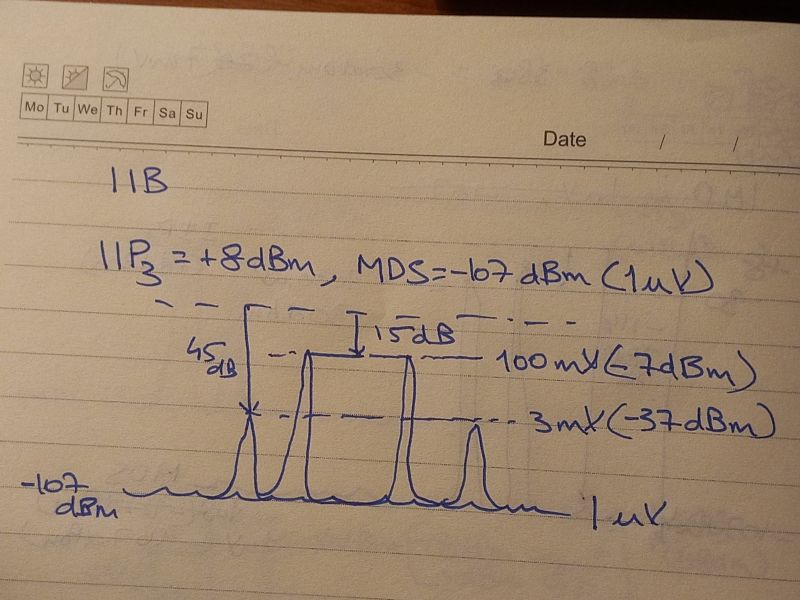
      6. Input Intercept of +8 dBm This needs some illustration. +8 dBm is about 7 milliwatts of power. When you overload the mixer with an unwanted signal of 7 milliwatts,  the distortion produces unwanted signals that appear to be 7 milliwatts too, it is where the distortion is equal to the signal itself. This is a theoretical limit.

Notbook calculations of the IMD

As you start backing off the overloading signal, for each db drop in the signal’s strength, the distortion drops by 3 dB. So, let’s imagine that we now drive the mixer with -7 dBm signal, the output, which is below 15 dB below the IIP3, accordingly the distortion would drop to  by 45 dB(15×3), now the distortion signals appear as (8 dBm- 45 dB) -37dBm signal.

Let me pick a more interesting RF signal of 7,000 uv, or -30 dBm. This is 38 db below the intercept level, accordingly, the IMD will be down by 38×3 =  114dB below the IIP3. The distortion is now at -106 dBm (1uV). Now, the distortion has gone into the noise floor. You can no longer hear the distortion. This is the dynamic range of the receiver. Impressive.

Controlled Gain, Block by Block

Our craft consists of stringing together filters, amplifiers, mixers and oscillators together.

One wonders : Is there a point in putting an IF amplifier at all? Should I add an RF amplifier?  Is it better to replace the diode mixer with an NE612? It is confusing all the way!
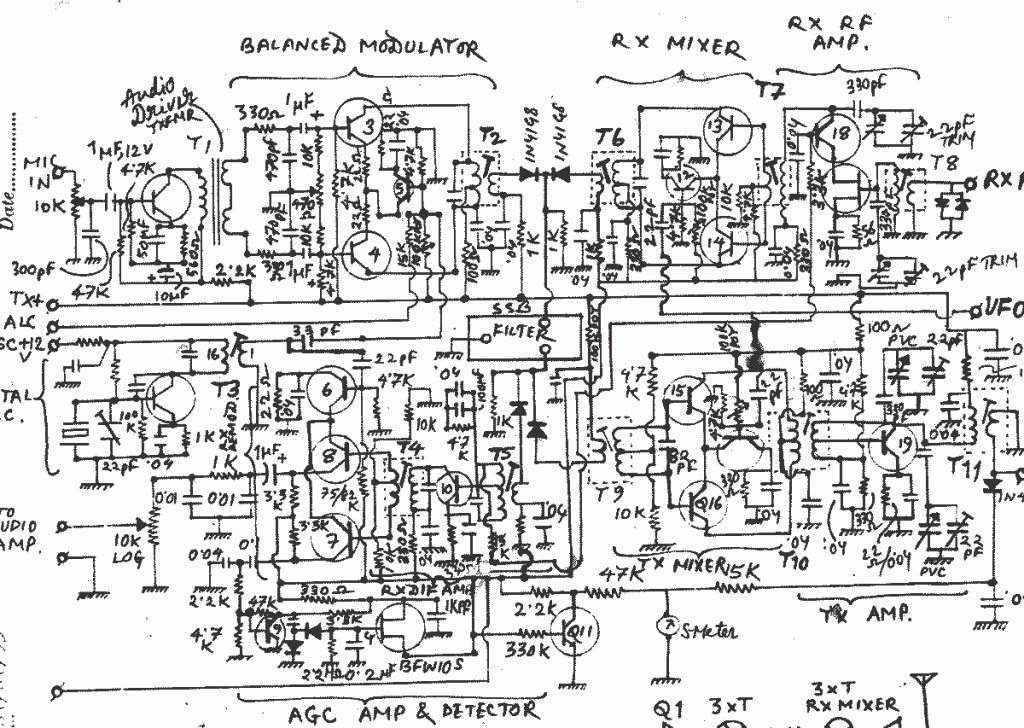
NR60, a homebrew design of the 1980s that wasn’t optimized for distortion

One assumed that more gain in a receiver meant better sensitivity. If the receiver sensitivity was improved, would it become much better? Actually, the converse is true. If the receiver is sensitive enough to be able to hear the atmospheric noise, then more gain will only overload the receiver. 

How does one really figure out which stage is overloading? How much gain is optimal in each stage?  How do we identify the offending weak stage in a radio’s line up of blocks? Some receivers turn out to be very sweet and clear even though they are simple while other simple ones don’t work just as well.

The art of building radios seems to be wrapped in some kind of black magic. 

Well, it is no black magic, it is simple mathematics. You can accurately predict how sensitive a receiver will be (by calculating the minimum discernable signal), how clear the transmission will be (by predicting the IMD : Intermodulation Distortion), how loud the audio will be etc., using a simple online calculator. This tool was first written in the 70s by Wes Hayward, W7ZOI which was subsequently published on the floppy disk that came with his book – Introduction to Radio Frequency Design. 

Diversion: This book is a classic, now available as a PDF. I would urge you to get it and take a print out and read it slowly, one page at a time. It is a far better investment than flipping through rigpix.com searching for your Radio porn. 
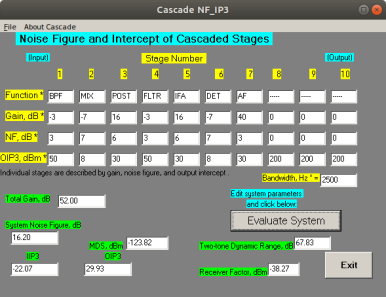
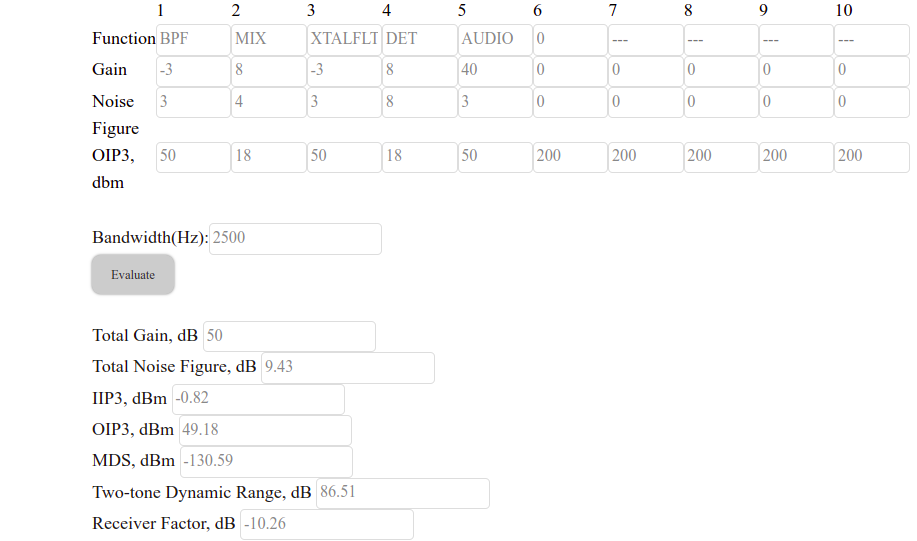
It works simply by filling in a table of columns, each column represents one stage of  either a transmitter or a receiver. For each stage you specify the noise figure, gain and output intercept (OIP3). Most RF chips, or circuit blocks do specify their performance in these three critical parameters.

[A Tip: In passive circuit blocks like the filters or diode mixers, the noise  figure is the same as the loss. So, if a bandpass filter has a loss of 2dB, consider that to be its noise figure as well. For passive filters you can assume the OIP3 intercept to be +50 dBm]

I wrote a web version of the same calculator. Once you have populated all the stages, you press the button and it gives you the results. It is available on https://www.vu2ese.com/index.php/2021/05/17/cascade-calculator/.

Here is a traditional superhet built the traditional way. Let’s examine it:
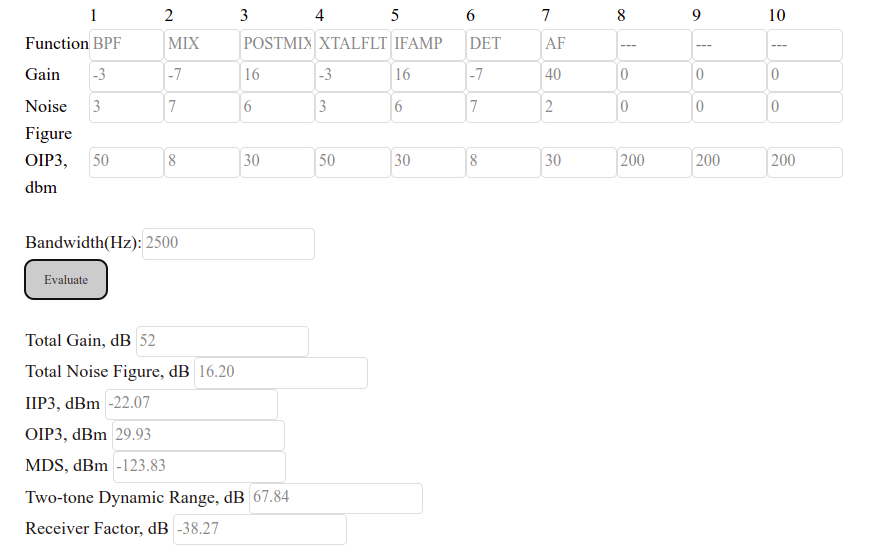
      1. We have a band pass filter in the front-end, followed by a diode ring mixer that has about 7 db loss, the diode mixer needs a post-mix amplifier to terminate it properly, 
      2. A 2N3904 biased at 20 mA would provide us with  a strong post-mix amplifier with +30 dBm OIP3,16 dB gain and 6 dB noise figure. 
      3. The crystal filter would have -2db loss
      4. A second 2N3904 as an IF amplifier with similar performance figures as the post-mix amplifier.
      5. The demodulator is yet another diode ring mixer with exactly the same performance as the front-end mixer.
      6. The audio preamp following the detector could be the common-base amplifier used for low impedance match with the diode mixer, it is traditionally biased for 0.5 mA of current, providing a good match but modest large signal capability.

You are encouraged you to visit this page(https://www.vu2ese.com/index.php/2021/05/17/cascade-calculator/)  and try out your own configurations. It is a bit like the Microsoft flight simulator, you strap the wings of a Boeing 777 on a Cessna and wonder if it will fly – It is highly edifying. 

“Simulation is the greater experiment” – Wes Hayward,W7ZOI

Here, as you can see, the two IF amplifiers will consume 20 mA of current each, the VFO and BFO outputs have be +7dbm (that is, 5 milliwatts) to drive the diode mixers properly. Each of those oscillators will consume 20 ma each. The buffer amplifiers that produce the 5 mW drive will also need to be biased with even higher current. I would put the total current consumption of this receiver at 100 mA. 

Notice that we are measuring how the signals progress and distort each other even beyond the crystal filter. That is, consider that there are two CW signals, one is a weak 1uV signal that demodulates as a 700 Hz audio. Right next to it, about 300 Hz away is another signal that is 1mV strong (about 60 db stronger). In the receiver we are discussing, the distortion will be very heavy and weak signals will be run all over by the strong one. 

On the other hand, if we use a really narrow crystal filter that will cut down the strong signal and keep it away from the stages following the crystal filter, we will have better luck snagging that DX. To simulate that, we just up the OIP3 of the stages that follow the crystal filter. The dynamic range is no longer just 67 db, we have a receiver with 93 db dynamic range!

This illustrates why some homebrew receivers will do much better operating PSK31 and FT8 where the entire band is within the 3 Khz audio bandwidth while others don’t. You have to design the radio such that all stages until the last audio amplifier are low distortion and high dynamic range.
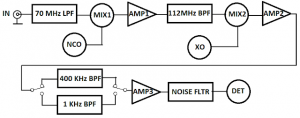
Block diagram of the Daylight Radio

Let’s now look at our proposed block diagram above of the Daylight radio. Given that the cascode mixer has 10 dB of gain and it doesn’t need post-mix amplifiers, we can eliminate the post-mix as well as the IF amplifier. The receiver consists of just three active elements : the front-end RF mixer, the detector and the audio amplifier. 

I have chosen 8 db of gain instead of 10 db, this is because we will be using lower input and output impedances of 1000 ohms instead of the optimal 2000 ohms as we discussed earlier. This is to simplify some other design considerations. This receiver is providing a whopping 80 db of in-channel dynamic range. You could have your neighbour down the road with his IC7300 blasting a 10 mv signal right inside your crystal filter. If your ears survive it, you will still hear the weak 1uV signal behind it all the same. If we want to see how well it does with signals outside the crystal filter’s passband, we just increase the detector’s and audio amp’s OIP3 to +200 dBm and get a whopping  96 dB of dynamic range. This is an incredibly good figure. Ordinarily, it costs you at least 2000 dollars to buy this performance off-the-shelf. And the good news is not over yet. Each of these two cascode mixers will draw just 4 mA of power! 

You will note that we also assumed that the audio has an OIP 3 of +50 dBm. How is that possible? This is because we are no longer using the conventional common base NPN transistor as the audio pre-amp. This would overload quickly. Given that the cascode mixers have a high output impedance of around 2000 ohms, we can directly drive an ultra-low distortion,, ultra-linear operational amplifier that overcomes distortion by using very high gain with feedback. That is the good ol’ NE5532. 

Why the 5 MHz IF crystal filter changes everything
QER crystal filter

I have often based my own radios with 12 MHz or 10 MHz IF. Typically a 4 MHz or 3 MHz VFO was required to mix this IF to 7 MHz or 14 MHz. The IF choice is pretty critical. You can end up with bad birdies. Any harmonic of the VFO can mix with some harmonic of the BFO and scream at you as you tune past that point. 

We chose a 5 MHz IF for three reasons: 

We could build an SSB or a CW filter at 5 MHz easily. At higher frequencies, the losses with narrower filters are much more. This has to do with the Q of the filter. We will discuss this later in this paper.

At 5 MHz, we can use a 2 MHz VFO. With such low frequency, the VFO can be really dead stable;  enough even for the digital modes.

An SSB filter at 5 MHzwill need an impedance around 1000 ohms, something that will directly match the cascode mixers on either side of the crystal filter!

This is a break from the tradition of basing all our stages at 50 ohms working impedance, which serves well all the time. Our test instruments are all designed to work at 50 ohms, our antennas work at 50 ohms, our cables work at 50 ohms. However, if we can afford to step out of this comfort zone and in a controlled way use the 1000 ohms as interconnects between a few stages, we can build a  very optimal radio, very easily.

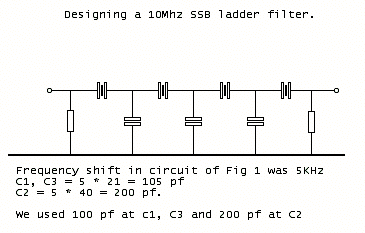
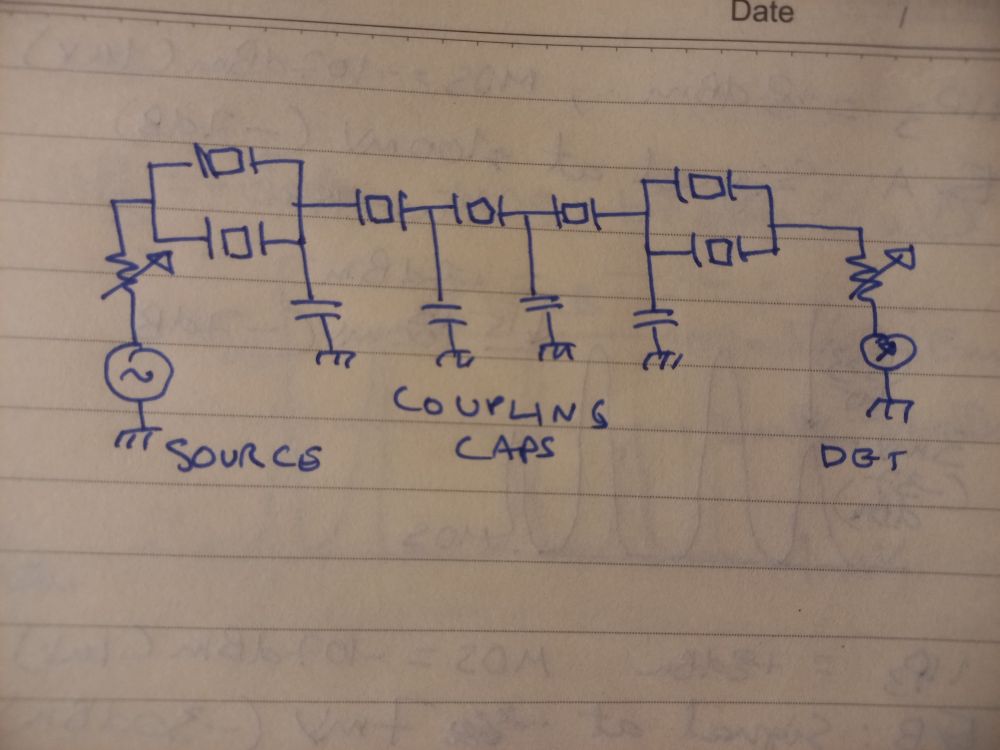
As this receiver was a rush job, we chose to quickly slap together  a QER filter. These filters are the simplest of crystal filters, all the coupling capacitors are the same value, you can use as many crystals as you want. The filter will get steeper and the losses will mount. 

An unintended consequence of too many crystals in a filter is that the group delays add up. Not all frequencies within the passband travel at the same speed through the quartz filter. It is as if the crystal filter is a highway; each lane travels at a different speed.  The longer the highway, the greater will be the added up differences between signals travelling in different lanes. This is the sound of overly filtered radios. Those who have used these ‘special’ filters in their commercial rigs will testify to the badly sounding yet costly radios. 

For us, about 5 stages are optimal for SSB and CW.
QER filter as swept on the Antuino

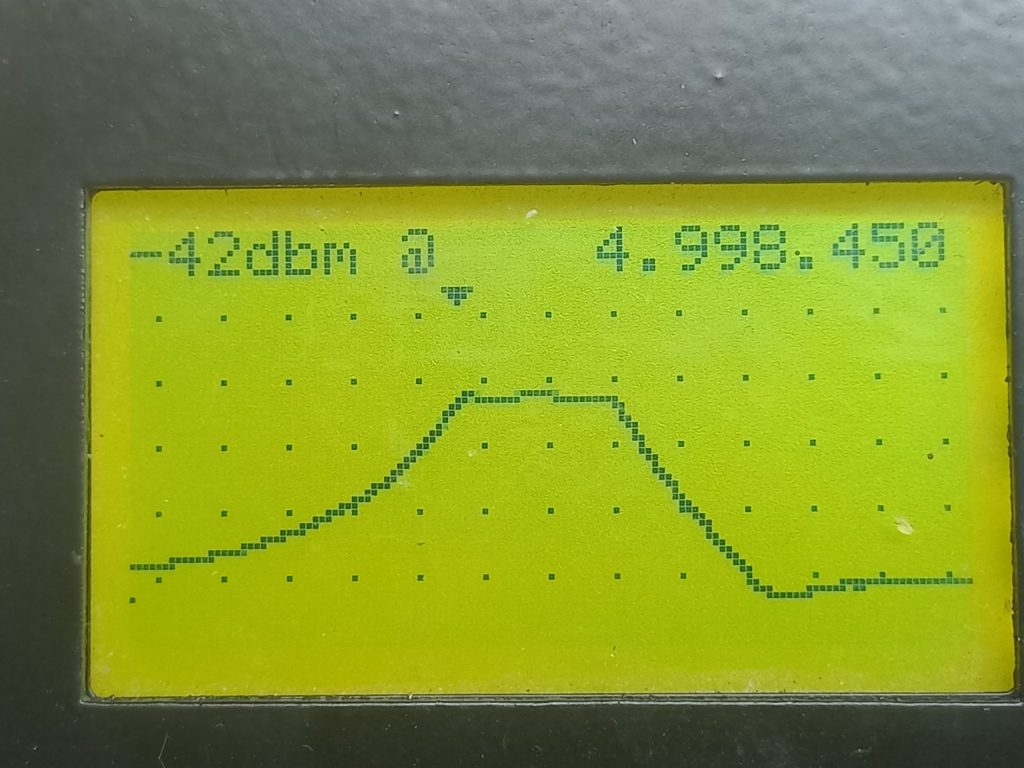
The QER filter can be built very simply if you have a NanoVNA or an Antuino. Please buy either of them today (Alert, I have interest in the company that produces the Antuino, further alert – the Antuino is out of stock). You start by physically building a crystal filter of the required stages with paralleled crystals at both ends. You chose a particular capacitor value, starting with 100 pF for all the coupling capacitors. Add 10 K variable resistors on both sides and sweep the filter. 

To reduce the bandwidth increase the coupling capacitance, to decrease the bandwidth, decrease the capacitors. To smoothen out the ripple in the passband, increase the resistors that act to vary the termination impedance. You can experimentally arrive at the impedance and coupling capacitance for the bandwidth you desire. The variable resistance can be read off using a VOM to determine the best impedance to operate the filter at.

Here is the time for another short digression. Often, many homebrewers ask on the forums “How do I measure the impedance of my crystal filter?”. You don’t. There is no characteristic impedance of any passive filter. Most filters are, what is known as, doubly terminated. This means that filters will exhibit strange and interesting passband shapes, phase distortions, SWR etc., when they are driven and terminated by different impedances. 

What we mean by the characteristic impedance of a filter is that the filter shape as advertised will happen only when it is driven and terminated at the specified impedances. A filter, by itself has no impedance.  End of the digression.

The Bandpass filter

We have traditionally used double tuned circuits. It kept away the broadcaster on the image frequencies, well, mostly. There were always the stations and birdies that tuned in the wrong direction. The image suppression was just about 50 dB. Some of the even more respectable amateur radio manufacturers of American heritage have chosen to use just a doubly tuned filter in the front-end. This is a false economy.

Addition of another capacitor and inductor makes this a triple tuned circuit with far better results. You can go crazy and make a four section or even a higher section bandpass filter but the performance gains will diminish for two reasons: 

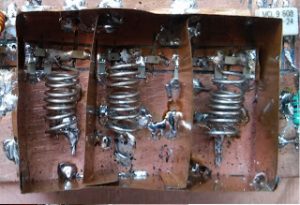
      1. For more than 80 dB of out-of-band rejection you will need to control leakages around the filter rather than through it. You will have to box up the filter, use good cabling, shield each inductor from the other with an interstage shield, etc. 
      2. With each stage, the losses mount. The narrower the filter, the lossier it is. It has to do with the ratio of the loaded to unloaded Q of the filters. With that in mind, here is yet another distraction on designing the band-pass filters. I have simplified it to the extreme. But here it is all the same. 

Let’s start.

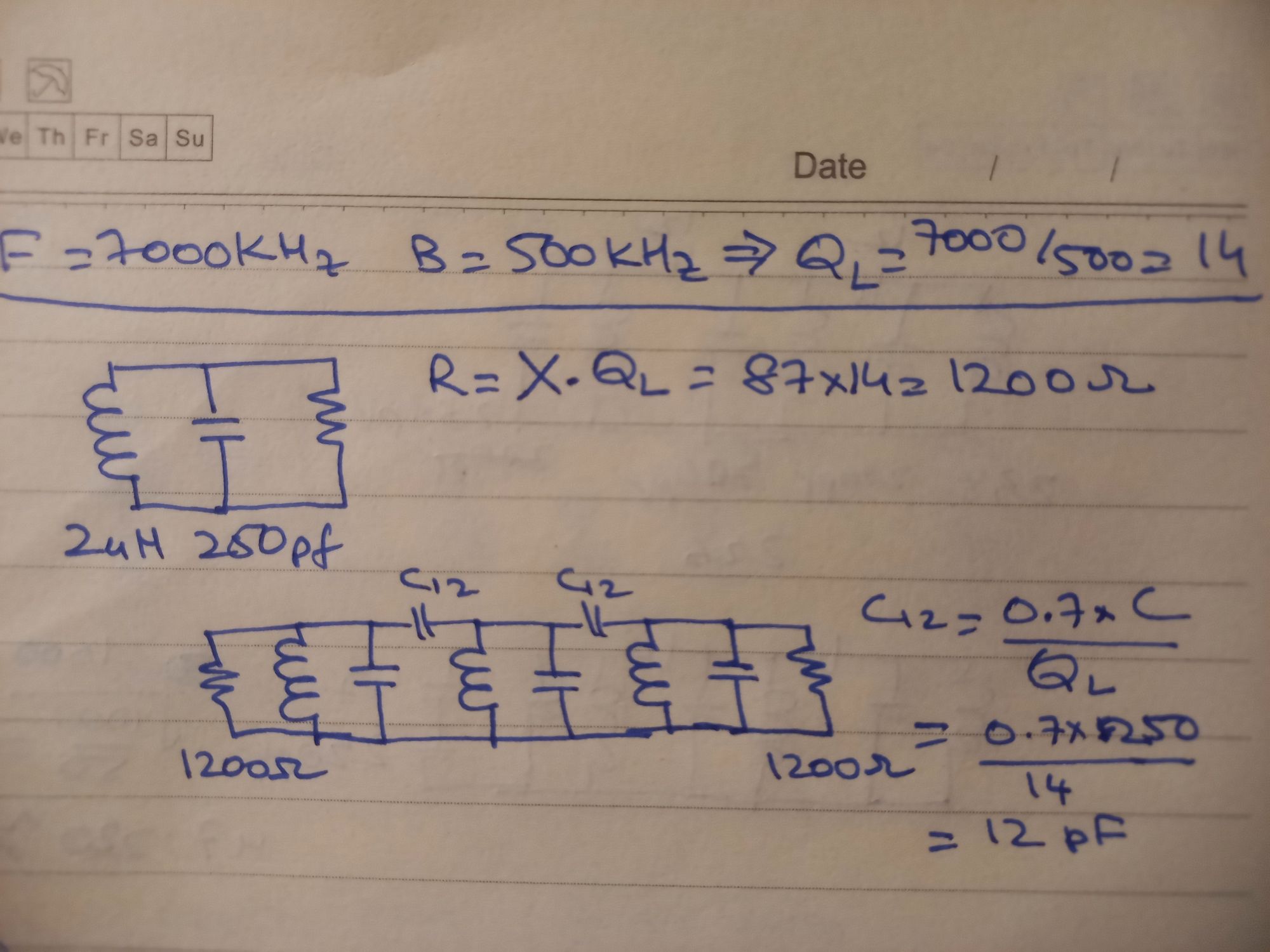
We have all heard of the Q factor (the Quality) for toroids, inductors, etc. Q is just the ratio of Center frequency to the bandwidth of a band pass filter. For instance, if you wanted a 100 KHz bandwidth from a 7 Mhz filter, that would be a Q of 7000/100 = 70. This is the loaded Q of the filter. As we discussed earlier, filters are specified at certain terminations. In our case, we are looking at a bandwidth of 500 KHz, 

So, the QL = 14 (7000/500).    (Eq 1)

What makes the Q high or low? It is the losses in a tuned circuit. Losses can be approximated by a parallel resistance too. This is where the impedance comes into play. Higher the impedance of the resonator in a filter, narrower the bandwidth. There is a simple formula to calculate that :

Rp = X * Q [ here X is the reactance of the inductor]

Let’s assume that we will use a 2 uH inductor, its’ reactance will be 

X = 6.28 * Frequency * Inductance = 87.92 ohms [or more accurately +j87.92] 

(We calculate reactance as an imaginary number, not important in this case)

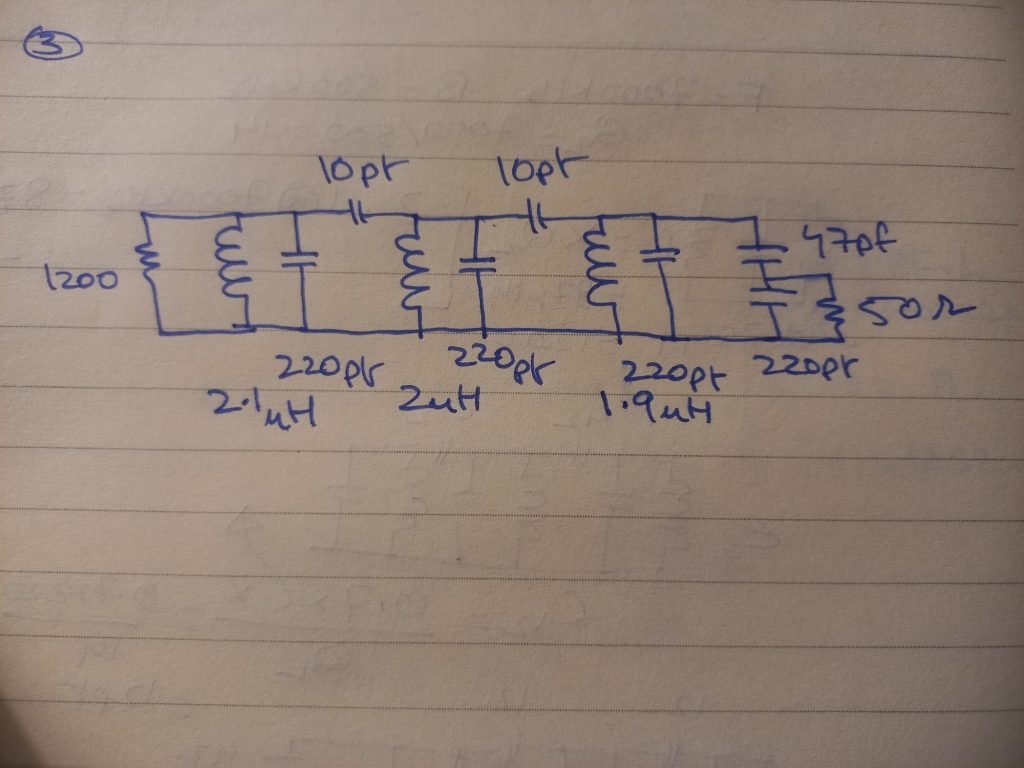
  Rp = X * Q =  87.92 x 14 = 1232 ohms. 

This must be the impedance of each of our resonators. To resonate this at 7.1 MHz, we will need 250 pF capacitors in parallel to the inductor. 

Next, we choose coupling capacitors. They are given as:

  C =  K x (Co / QL) 

Here Co is the 250 pF capacitor used to resonate the inductor, K is a magic number. Different types of bandpass filters will provide different numbers, they relate to the polynomials the filters describe. Just trust me and use 0.7 here.

C = 0.7 x (250pf /14) = 12.5 pF

Instead, we will just use 10 pF.

There is a subtle detail now, the coupling capacitors add to the total capacitance seen by the inductors decreasing their effective frequency of resonance, we will need to reduce the 250 pf parallel capacitance by 25 pF to bring the resonance back to 7.1 MHz. So, each parallel capacitance is now 220 pF, this is excellent as we can buy 220 pF capacitors.
Bandpass filter, Designed.

Don’t reach for those disc ceramic capacitors yet. They are horribly lossy. Buy some decent NP0 capacitors, they are pretty cheap from the Mouser. If you buy a few hundred of them in 470 pF, 100pF and 10pF values, they will last you a lifetime of homebrewing on HF. If you are rich, order some 2.2pf as well. Remember NP0 or C0G only. Alternatively, if you can buy the polystyrene capacitors they are the best for the VFOs as well as bandpass and low pass filters. You can synthesize other values by just paralleling them up.

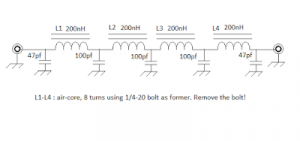
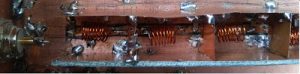
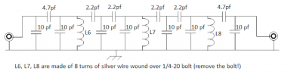
The bandpass filter will attach to the cascode mixer at one end that terminates in 1.2 K ohms (Actually I used 1K resistor). So, the inductor value will have to be adjusted again to resonate back to 7.1 MHz. The bandpass filter has to connect to the antenna at the other end at 50 ohms, we just have a capacitive voltage divider. The ratio of the 1000 ohms of the band pass filter to 50 ohms is 20:1. This would need a voltage division of Sqrt(20) = 4.4. Thus a 47 pf in series with a 220 pf would divide down the voltage. We will have to change the last inductor to again bring the central frequency back to 7.1 MHz. 

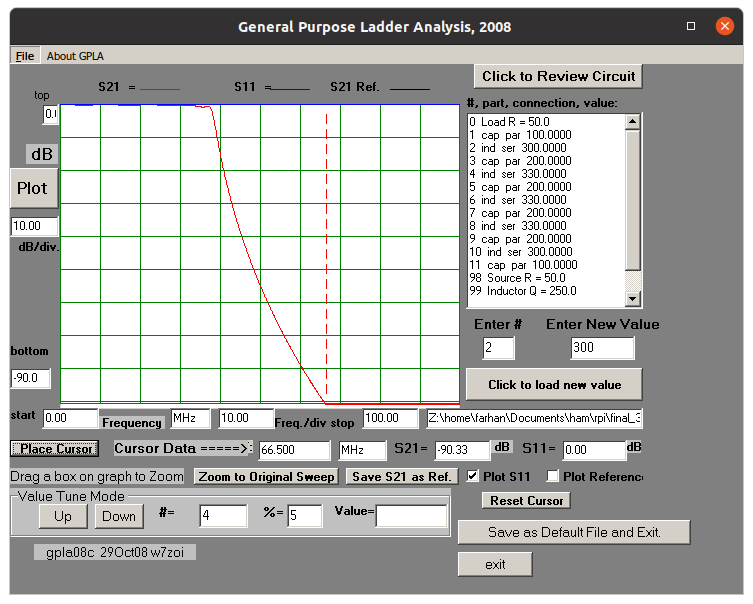
It is simply easier to change the inductor by varying the number of turns and keeping the capacitance constant. We don’t have to physically keep winding and unwinding the inductors. We can do it in LTSpice while watching the band pass shape or we can do it in GPLA, a program that comes with the EMRFD CD. Here is my tuned version of the triple tuned circuit with the inductor values needed. 
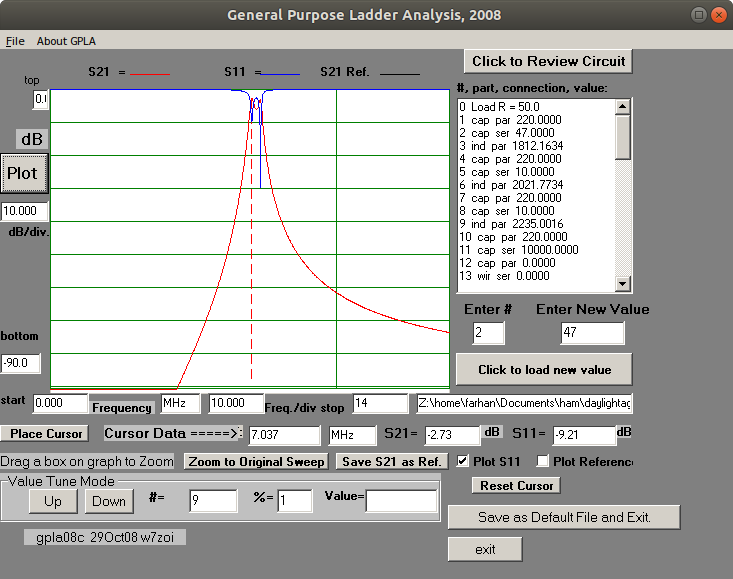
Bandpass filter simulated on GPLA

These tools are amazingly accurate in predicting the exact values. But how do we arrive at the exact values? We will have to use the Antuino or the NanoVNA. We build a simple jig that has RF connectors on two ends directly connected with a wire. We sweep this and see that there is no loss to begin with. Then we add a series trap of a known capacitor, say 220 pF and the unknown inductor and sweep it. It gives a deep notch at the resonating frequency. You know the frequency, you know the capacitance, now you can back calculate the inductance, very accurately. For instance, I needed a 2.1 uH inductor, with 220 pF this should give a notch at 7.4 MHz. In the first try with 40 turns the notch turned up at 7 MHz, I hit 7.4 MHz (after taking off 8 turns,) at 33 turns.

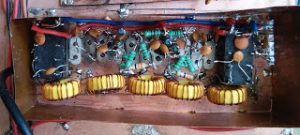
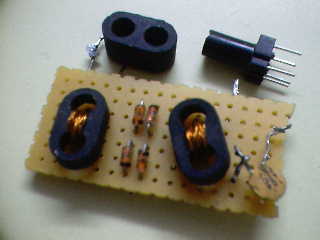
3D printed toroids
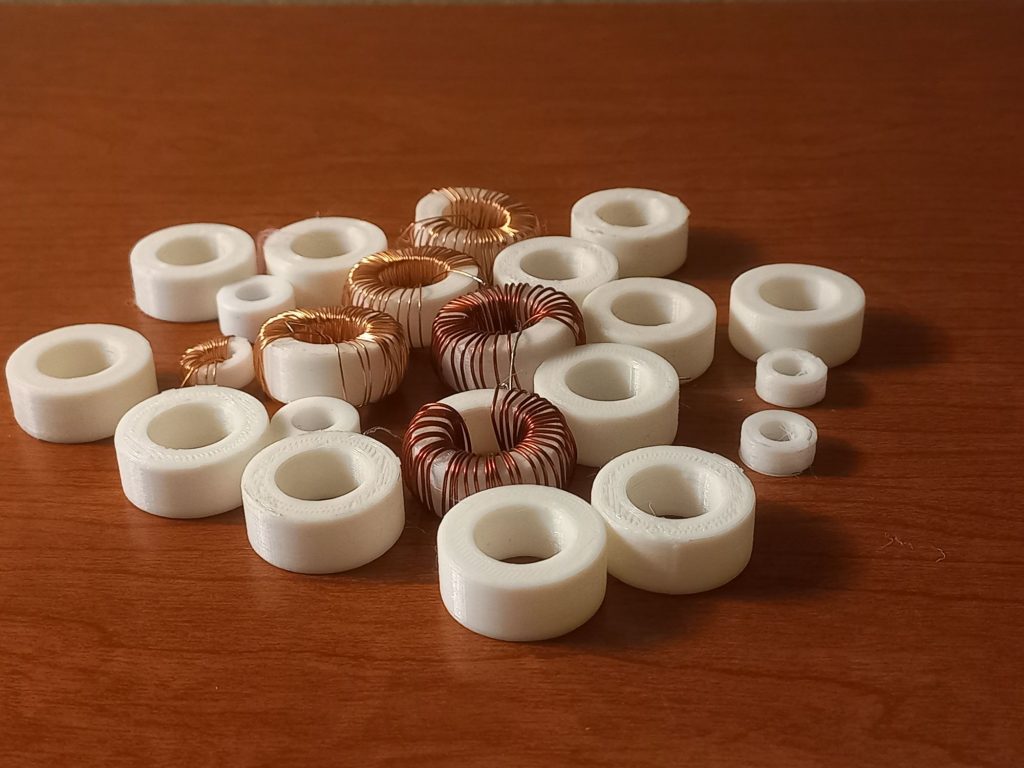
Yet another digression, this one will save you money … You can 3D print toroids!! We experimented with various sizes and finally landed up with 1 inch outer dimension toroids that reports a Q of about  150. Pretty reasonable for toroids that are almost free. You can print 10 of them at a time on the a home 3D printer. This was a big learning from this project.

We have used them in the bandpass filter as well as the low pass filter. They perform pretty well. To calculate the inductance, you have to square the number of turns and multiply with two.

Inductance [in nano henry] = 2 * (number of turns)2

The Receiver, then

Here is the receiver part of the radio in all its glory. 

Receiver Portion. Click on it for a larger version

The Audio filter

The active audio filter is a surprise. This is really a worthwhile addition. With less than 1 dollar worth parts, the receiver audio improved immensely. Instead of using op-amps, we just use 2N2222A as unity gain amplifiers, this is just to demonstrate that there are many ways to get there.

The audio filter has a cut-off around 2 KHz. SSB and CW, both sound warm and nice. The difference with and without the audio filter is dramatic, you want to put it back on again immediately if you throw the switch to bypass it. Note that the entire audio chain from the demodulator to the volume control is DC coupled. This needs the cascode demodulator’s audio output to have a DC operating voltage of around 8 volts so that there is enough head room for the last of the filter transistors to not bottom out at large signal levels. The audio cut-off is determined by the 3.3K resistance. I misplaced them in the shack and soldered 1K and 2.2K resistors in series. For CW work, you can reduce it to 1K.

The PTO
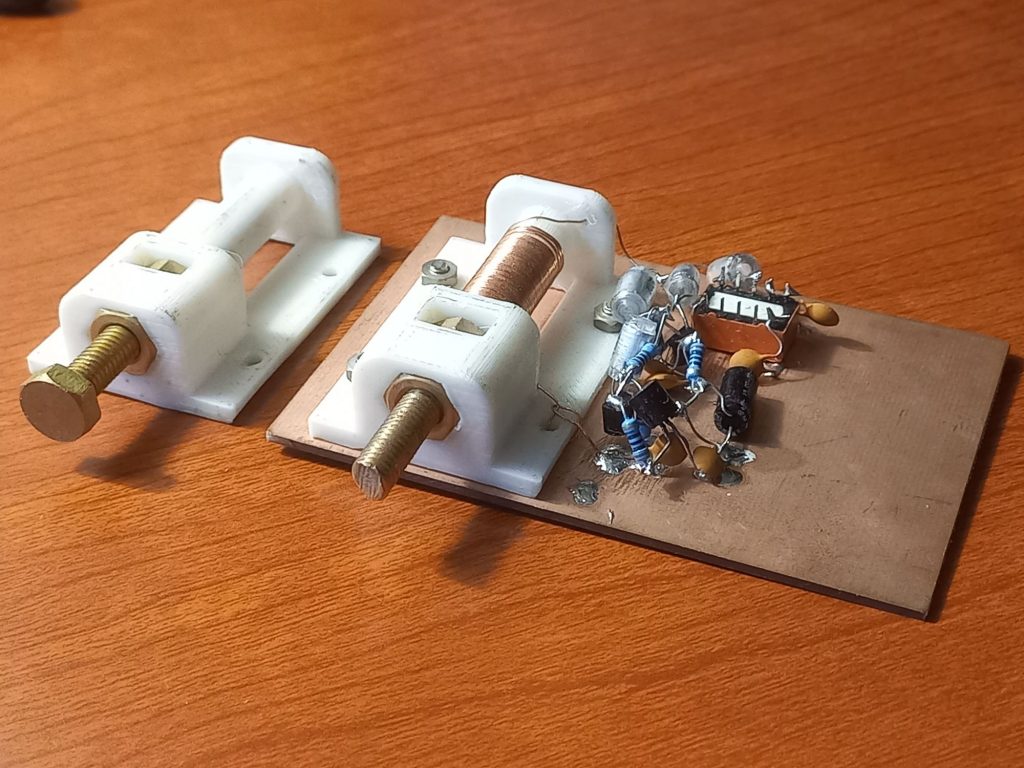
The VFO is another 3D printed part. Instead of hard to find variable capacitors, we use a variable inductor to tune the band. After all this is 2022. Slow motion drives are hard to find. They are messy to install, they exhibit backlash. Instead, we used a simple 3D printed PTO. It is essentially an air inductor about 5 cm long that can be horizontally mounted on the PCB with four M3 screws. It has two slots where you can insert nuts for 1/4-20 screws. A nice long brass 1/4-20 bolt is the main tuning element that moves in and out, guided by the two nuts held firmly in their slots. It provides around a decent, 25 KHz tuning per turn. It took 40 turns of 22 swg enamelled wire to fill the former end to end. The tap is at 10 turns. The 3D printed PTO is really easy to build. It prints in 15 minutes. It is dead stable at 2 MHz. To net to the exact frequency range, you can add or remove turns on the PTO former.

Three polystyrene capacitors of 470 pF each, in parallel, brought the tuning in the range of 2 MHz. A serendipitous advantage of 2 MHz PTO that tunes upwards is that a regular frequency counter can be used for accurate tuning. 

A 78L09 was used as the PTO’s voltage regulator. A simpler choice would have been to use a 9.1v Zener diode. We didn’t. The zener regulator works by sinking current that the VFO isn’ consuming. This current converts to heat which can drift the VFO. On the other hand, if we reduced the current, the Zener would starve and turns noisy and the regulation would suffer too. Instead, the free running VFOs are best powered by 78L09. They hardly sink any current, they are noise free if they are properly bypassed both at the input and the output. For a VFO you must also bypass it at audio to remove any hum modulation. A 1uf electrolytic capacitor mounted very close to the terminal output pin is recommended. 

The PTO has the minor visual disturbance of a knob that comes out and goes back in. It is best to leave it tightened against the chassis when not in use or that take it away with you to prevent other prying hams from using the radio!

We use a low power single JFET as a buffer. The cascode mixer and the transmit mixer hardly need any driving power and hence the bias current is kept low.

The PTO is built with just the component leads themselves. A box made from thin copper sheeting is soldered around it to keep it thermally stable and prevent the RF from the transmitter, etc from coupling into the PTO. Without the shielding, there was a transmit spur at 8 MHz, probably from the PTO’s 4th harmonic. It went away with the shielding and it was never fully investigated.

The Transmitter

Click on the image for a larger picture

We could have used separate transmit and receiver filters and only used the PTO and the BFO as the common elements. This has been the usual practice except for the BITX line of radios.  

A future plan to make the radio have full break-in will need a rebuild with a separate set of filters. To save time and space, we switched the filters between the receive and transmit sections.

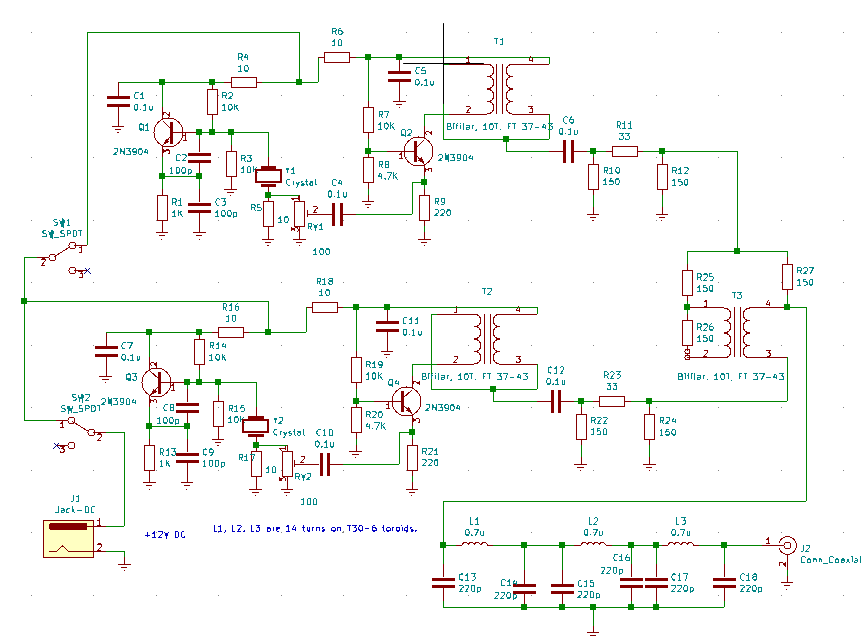
The transmitter uses NE612 (also sold as SA602) as the modulator as well as the transmit mixer. Isn’t this a bit of a bummer. After all, isn’t NE612 thought to be an underperformer best used in boy scout direct-conversion receivers? 

The NE612 can’t match a diode mixer in a receiver application, but it has its own advantages in a transmitter. This is where science takes over the lore. 

The NE612 is a doubly balanced mixer with very good suppression of the injected oscillator as well as the input signal. It is hard to surpass it as a DSB modulator. It has an output intercept of -10 dBm, This would mean that if we extract a -20 dBm signal from it, then the IMD will be 30 dB down. Respectable level for the IMD is -26 dB below the peak tones. A -20 dBm signal is a strong 30 mV signal with IMD down by -30 dBc. You will just have to amplify it up. 

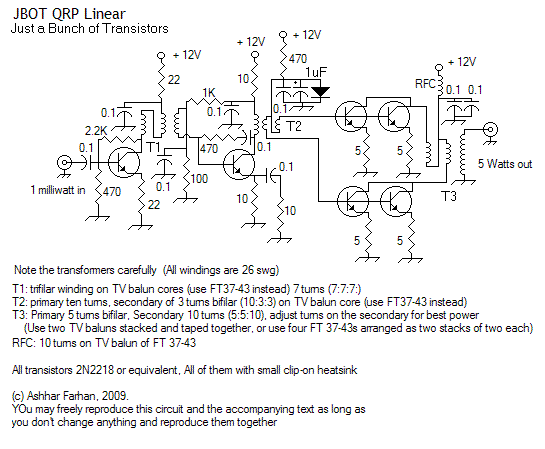
Additionally, the NE612 mixer input is sensitive enough to not need a microphone amplifier. A termination insensitive amplifier built with three transistors provides a 20 dB boost to produce a 0 dBM signal that drives a traditional amplifier made from 2N2222As and an IRF510. We used similar 3D printed toroids in the low pass filter as well. 

At first, a two section output low pass filter was tried. The 14 MHz harmonic was just below -43 dBC, another section brought it below the 50 db level. Now, the output harmonics are virtually unnoticeable. 

The T/R switching can be improved. An electronic T/R switch can be made that can be the the start of a full-break CW modification for the radio.

Full circuit (click to enlarge)

Concluding notes

There are some surprises here. Except for the transmit power chain, no broadband transformers were used anywhere in the design. This was an unstated design goal. They can be easily removed from the PA as well. An L network can easily substitute them. We will still need ferrites for the RF chokes. 

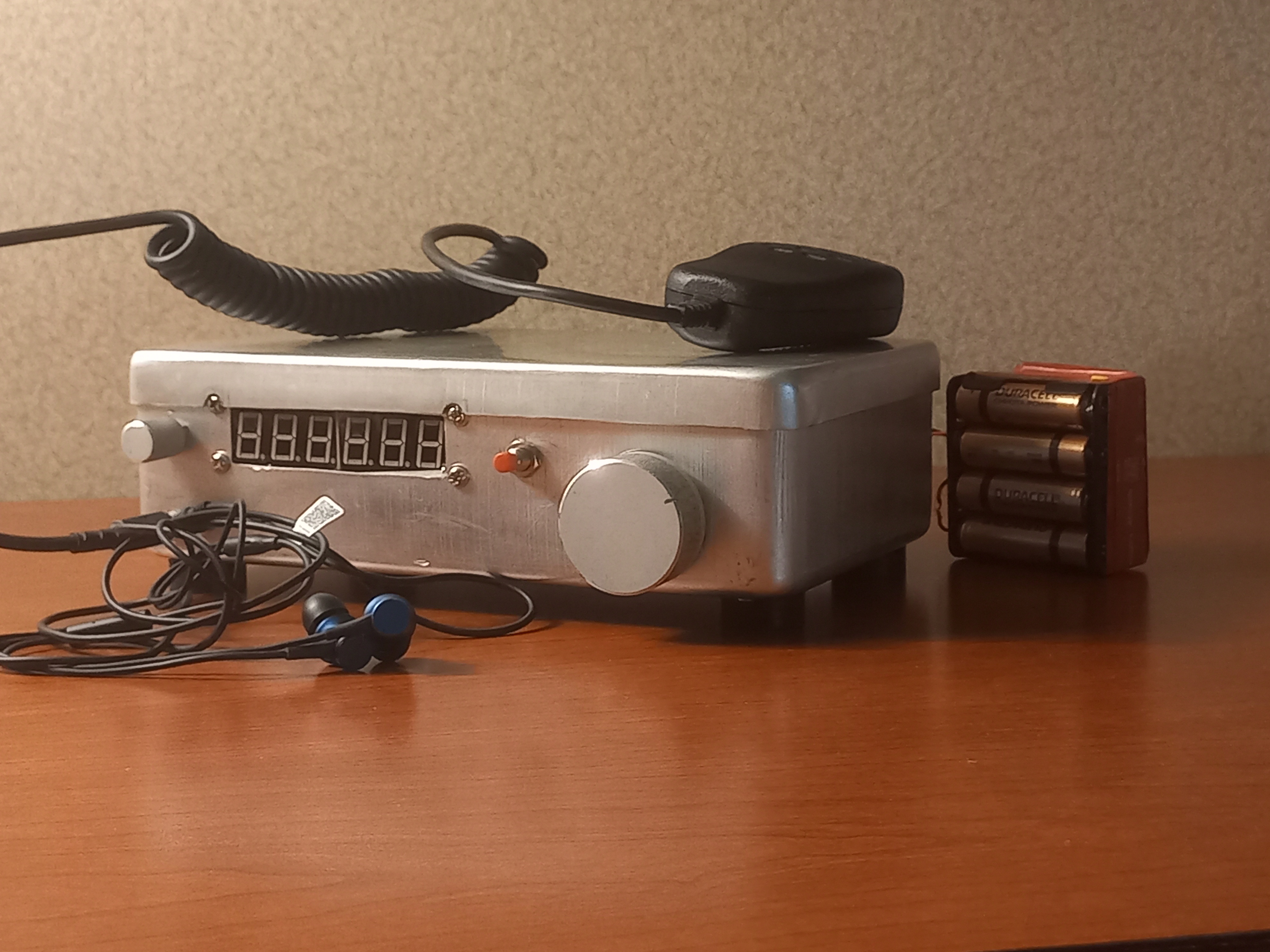
We added a frequency counter bought off the net for five dollars as a read-out. The receiver squeals each time it is connected due to the horrible RFI generated by the counter. Until a low noise frequency counter is homebrewed, we have an ‘arrangement’. There is a push button that switches on the frequency counter for you to ‘spot’ yourself. It is a little like the frequency markers of days gone by. Press the button to know where you are.

The receiver is really pleasing. I personally have an almost 99:1 ratio of receiver to transmit. I listen to bands almost daily, for hours while working. Receiver audio quality is important for me. The Daylight radio doesn’t wear you out. The active filter, very low phase noise PTO, broad crystal filter, make it a pleasure to use. 

The few contacts were interesting. We are able to regularly decode FT8. I am not sure if this is a happy accident or repeatable performance. We are yet to complete a two way FT8 QSO. Audio transmission is reported to be clear and intelligible.  

The Daylight Again radio is also an ode to the darkness of the last two years. To celebrate us who are gathered here again, to invoke the soldersmoke and our endeavours to get across to each other, entirely on our own. 

I owe a great deal to my fellow hams at Lamakaan Amateur Radio Club for their help. Radhakrishna “RK”, VU2EHR designed the 3D models of the toroids and the PTO which form the basis of this work

Venu, VU2BVB and Anil, VU2DXA helped with testing and making the lunchbox chassis. A big thank you to Wes, W7ZOI who wrote the seminal works that form the science of all that we do. His tool, Cascade, is central to planning any radio, analog or not. 

Much of the filter theory too is distilled from a close reading of the book Experimental Methods in RF Design. I have heard that the book will not be printed anymore. That’s tragic. All important texts should not be viewed primarily as commercial ventures. I hope some of us can impress upon the ARRL to continue to print it or release it out as a free/paid PDF. 
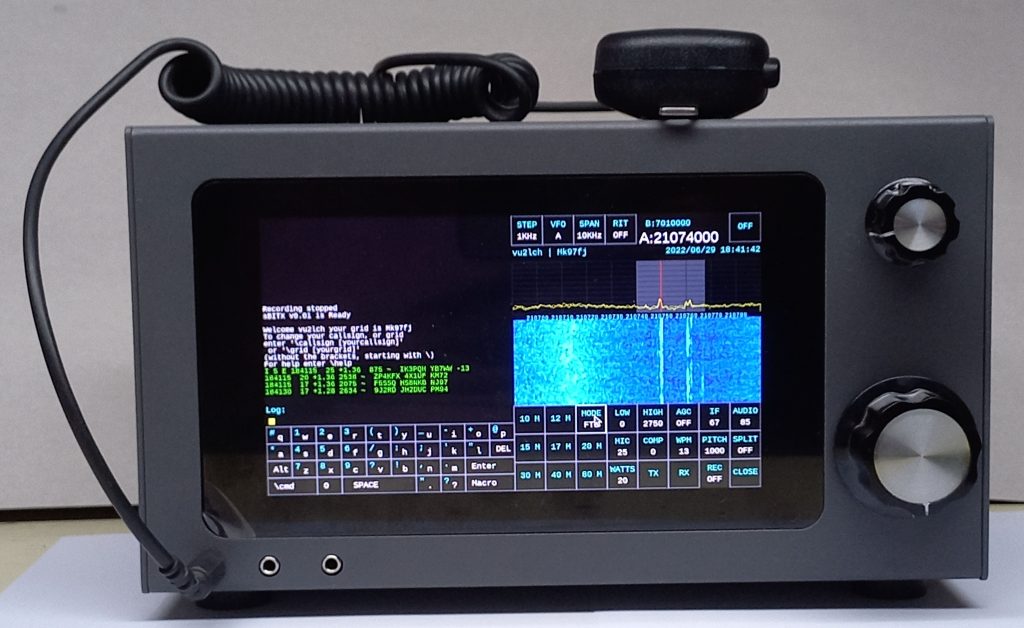
  

The sBitx –  The SDR for the homebrewer

The sBitx is a homebrewer’s SDR radio with integrated digital modes.

  • Maximum power output of 40 watts on 80M and 40M bands, goes down to 20 watts on 15M and 6 watts on 10M.
  • Based on a Raspberry Pi, a WM8731 codec and ordinary components found in your junkbox
  • Uses a hybrid superhet architecutre for high performance design
  • You can build it for less than $100 in new parts in addition to the Raspberry Pi and Display.
  • The circuit is simple to build without any FPGAs and expensive parts
  • The software is hackable, modular.

For those who can’t wait.

  1. Download circuit diagram and software from https://github.com/afarhan/sbitx
  2. Here is the Raspberry Pi Image for the sBitx. Download, unzip and burn it into a 32GB SD card.
  3. Read the Operating Manual (it is frequencly updated, don’t download and print!)

Why should we homebrew an SDR?

It is a good question. Considering that the author devoted most of his last five years to building and writing one, there should be a legitimate answer to this.

Because it is there

Was it George Mallory who, whe was asked why he wanted to summit Everest, replied “Because it is there”?

I am reminded of the work that early transistor pioneers like Wes Hayward, W7ZOI and Doug Demaw, W1FB did for the transistors. At that time, the transistors were unwieldy beasts, fragile and confusing. They had no similarity with the valves that were prevalent at the time. Their series of articles in the QST culminated in the book Solid State Design for the Radio Amateur. It changed everything and made the new technology accessible and easy. Furthermore, the prices dropped, valves went out of stock and the world became transistorized very quickly. The radio amateurs were already there.

Does this mean that the old analog radio is dead? Well, not at all. Analog electronics is the basis of all radio science, even the software defined radios. This project proves that our learning from the conventional superhet radio engineering can well be applied to the SDRs.

Increasingly, more and more radios will be built with software defined architectures. We must bring our craft right into the cutting edge of contemporary science rather than the trailing edge; especially when it comes laden with gifts.

Running CW on an SDR is perfect joy. Especially if it is a radio that you have made all by yourself. The filtering is ring-free; the sending is perfect with the macros and a computer keyboard, logging is transparent, recording your brag tapes happens with a touch, adding quirky features does not require you to drill holes in the front-panel or soldering!

The Learning

A large part of our hobby is to constantly learn new stuff. Amazingly, age is on your side.. The experience with building and using our equipment makes us better with age (Guilty as charged, I am on the better side of the 50s). However, when I set out  to study software defined radios, unlike staring at a circuit and ‘getting it’ within minutes, I realized that the software was thousands of lines of code, usually written to get the job done rather than to explain the job being done. It was impossible to study it, let alone modify or borrow from any of them. Hence, the need to write a new SDR that is easily understood and adapted, modified and extended to do more and more exciting things.

You can think of the sBitx as a stable start of your learning of the SDR. It has certainly been for the author who started with Zilch. The main source code to receive and transmit fit into a single page (just like a QRP radio’s circuit would), the actual circuit can be put together, from your junkbox!

Budget Performance

Usually, it takes a large investment and lots of time and work to build a station that matches a commercial radio. The fancy radios available for thousands of dollars has all the knobs and buttons that allow you to do smart things that make life simple. However, behind that front panel, everything is software, and the software can be free! That’s the hidden beauty of a software defined radio.

Consider that you built a super simple SSB rig, like Pete Juliano, N6CQ’s  PSST(https://www.n6qw.com/PSSST_20.html), It has all of seven devices. Now consider adding variable bandwidth filters, AGC, upper and lower sidebands, other voice modes, CW, RTTY, even FT8. The project will look enormous! However, it can all be added with just a Raspberry Pi and an audio chip!

Instead of looking at SDR as an expensive, complex approach to building radios, think of it as an easy way to add all the features of a professionally produced radio for no extra circuitry!

With the SDRs, the homebrewer can finally build radios that are as feature laden as the commercial radios, customize them to their hearts’ content and do it at a fraction of the cost of commercial radios.

Works the world from anywhere

Our last argument for an integrated SDR like the sBitx is that it allows you to quickly setup a station from anywhere without the entire paraphernalia of cables, computer interfaces, etc. and work the world on less than optimal antennas like mag-loops and whips because of the amazing software that works at digging signals right out of noise!

Setting up a station with loggers, data software like WSJT-X, Fldigi and homebrew radios is a mess of wires, configuration files and things going wrong.

An integrated radio like the sBitx is a first. Everything comes pre configured on a single SD card. It is built to a particular digital hardware (the Raspberry Pi with a stereo 96 ksps codec). Just switch on and go!

The Hybrid SDR

The central challenge to building an acceptable SDR radio is to choose an architecture and circuitry that will eliminate the image. For phasing SDR radios the image is just a few tens of KHz away, creating ghost signals. For direct conversion radios, the spurious responses are determined by the number of usable bits in the analog to digital and digital to analog conversion circuits. These can be very expensive and very hard to build in the homelab. Typically  these ADC have ball grid array pads below them that can only be soldered properly by pick and place machines.

Engineering is the art of compromise with science. It is where the practical considerations meet the hard truth of mathematics of physical laws.

The Hybrid SDR solves the image problem using the best analog way available: Use an aggressive crystal filter in a superhet architecture.. The hybrid approach to SDRs is a huge gain in terms of ease of build, performance. This compromise is the width of the waterfall : the sBitx limits itself to a maximum of 25 KHz of spectrum scope.

Is 25 KHz waterfall enough?

Those used to watching the waterfall of an entire band may think this is a limiting factor. Actually, it is not. Most of the CW operators, even in contests, operated within 10 KHz span at a time. This makes it easy to see closely spaced signals that will get clustered too closely even at 25 KHz widths. Much of DX hunting and expeditions happens in very small windows in a band.

The digital modes like the FT8 or JS8Call limit themselves to within 3 KHz. So, even 10 KHz of waterfall is wasted on them.

In a contest, if you are running (Calling CQ and waiting for others to return your call) you just stick to one frequency and listen a few kilohertz up and down. If you are tuning around in a contest, picking up the weak signals, it is best to have a magnified waterfall to see the faint traces of the individual signals.

The  Up-converting superhet

The sBitx is an up-converting superhet with the IF at 40 MHz. This eliminates the need for multiple filters, one for each band of operation. As our frequencies of interest are below 30 MHz and the local oscillator is above 40 MHz, the image frequencies are well above 80 MHz. These are easily filtered by a simple low pass filter for the entire HF band.

Central to the approach of the sBitx is that we can build a 25 KHz width crystal filter that has a very sharp image rejection. This is now possible with the easily available, low cost 40 MHz fundamental mode crystals (ABM10AIG-40.000MHZ-2Z-T from Mouser.com).

Homebrew-ability

With a superhet architecture, we can use our familiar techniques of building one in multiple ways. From using diode mixers and bipolar transistors to using passive FET front-ends without early amplifiers, these can be hand soldered, without needing PCBs.

Circuit Description

The Exciter

Figure 2

Figure 2 shows the entire circuit of the SDR’s exciter that is capable of power output of around -15 dBm and a full receiver from DC to 30 MHz.

This is a minimal, bidirectional superhet that is optimized for high performance from each stage.

On receive the signals pass through the low pass filter made of the L16 to L21 to a passive FET mixer that upconverts the RF signal to 40 MHz IF.

At 40 MHz IF, a 25 KHz wide crystal filter provides image rejection and the following IF amplifier and a diode mixer convert it down to a low IF of 24 KHz. A high dynamic range audio pre amplifier raises the signal to a level that can be digitized by the codec on the digital board, explained in the section on The Digital Part.

On transmit, the 24 KHz  transmit signal, generated in the digital board, is upconverted to 40 Mhz in a diode mixer, amplified and applied to the 40 MHz crystal filter before being downconverted in the same FET mixer to the HF band. The image is filtered by the same filter that was used in the receiver.

The Lower Pass filter

The main purpose of this filter is to provide a filter that is slightly more Chebychev rather than Butterworth by reducing the inductance of the ending inductors. This provides it with a sharper cut-off. The response of the low-pass filter is as follows (Figure 3):

Figure 3

The Q of the inductors need to be only higher than 100 in this filter as it is a fairly broad filter. Even air core formers can be used as long as they are well shielded from each other and from the Power amplifier circuitry. Stray coupling of these inductors with power amplifier transformers and filters can cause oscillations.

Very often, the LC filters that we build under-perform compared to their simulation. There are just three reasons for this :

  1. Low quality capacitors and inductors. It is best to buy all the RF filter capacitors from a reputed online retailer like mouser.com or digikey.com. The only ones that are useful are the NP0 or the C0G variety. For inductors, the micrometal toroids are recommended.
  2. Insufficient shielding: Very often, the inductors are close to each other and the unintended coupling between them can heavily compromise the filter performance. Use a physical layout where the inductors are all in a line and oriented perpendicular to their neighbors. Shield the entire filter with copper sheets.
  3. Bad grounding: The filters have to be built over a large ground plane with short connections between the circuit components and the ground. Each component should be grounded separately. Longer traces or wires to the ground will add stray inductance that compromise the filters’ performance.

The Front-End

We use a passive FET front-end with +28 dBm IIP3 that is as simple to build as a diode mixer. It uses a single trifilar transformer and a low cost FET analog switch. Experimenters can also use a pair  of switching mosfets like the BS170, etc.

This front-end was first described a the KISS mixer by Chris Trask, N7ZWY in the paper Mixer Musings and the KISS Mixer. You can read this highly informative paper on https://www.mikrocontroller.net/attachment/146369/Mixer_Musings.pdf.

Although Trask reported an astounding +40 dBm intercept point, he only measured it against a strongly terminated IF port. In our application, we directly drive it to (and during the transmit, from) a highly reactive crystal filter as a load which degrades the intercept point to some extent. The good news is that unlike a diode mixer, the local oscillator currents do not flow through the FET, making passive FETs more resilient to improper termination.

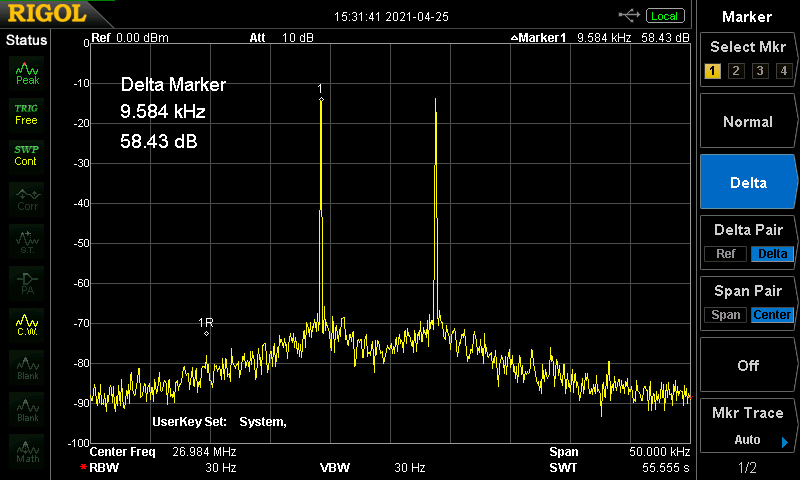
Our measured intercept was at +28 dBm, with a loss of 4dB. The figure 4 shows the IMD with an input of -10 dBm / tone(disregard the marker of 1R, it is an artifact from a previous reading). The output is attenuated by 10 dB to prevent overloading of the spectrum analyzer. The IMD is barely recognizable at even this high power level.

Figure 4

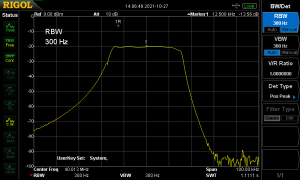
The Crystal Filter

Central to our radio is the 40 MHz crystal filter with a flat top and a very sharp upper side response. The filter begins as a Min-Loss Cohn filter with 2.2pF coupling capacitors and 2K termination impedance. We then, modify it by paralleling the ending crystals. This has the effect of doubling the motional capacitances and halving the motional inductance of the ending resonators, resulting in a relatively flat response.

The figure 5 shows the response of the filter as measured on the sBitx PCB. Given that the coupling capacitors are just 2.2pf, the layout becomes critical. The center of the passband is at 40.013 MHz and there is a steep attenuation on the higher side, this is where we will position the second oscillator; somewhere close to 40.036 MHz.

The local oscillator(s)

We chose to go with the low cost Si5351Bx that is readily available, both as a chip and a module. It can simultaneously output three clocks at different frequencies.

At a late stage in the design process, it was noticed that there is an internal ground bounce inside the chip that couples clock 0 output to clock 1 output.  This leakage was less pronounced between clock 2 and clock 1.

In the final design, we use clock 2 as the local oscillator to the front end. The clock 2 tunes from 40 MHz to 70 MHz, providing a coverage of 0 to 30 MHz. Using a slightly different front-end (for example, a diode mixer), it will be possible to extend the coverage to other VHF bands as well. The oscillator itself is capable of working in excess of 250 MHz.

The clock 1 is used as the second oscillator, it can also be viewed as a BFO, except that the output of the diode mixer is not demodulated SSB. The  clock 1 is about 25 KHz above the center of the filter’s passband, at 40.035 MHz. This results in a 25 KHz of RF signal being converted to the range of 11.5 KHz to 36.5 KHz, something that is easily handled by audio techniques and subsequently digitized using an inexpensive but high performance stereo audio codec.

The Si5351 has better than average phase noise but not stellar. It can be considerably improved by using a low noise reference input instead of the in-built crystal oscillator. Hence, a low-cost Temperature Controlled Crystal Oscillator (TCXO) is used as the reference oscillator.

This also eliminates the need for frequency calibration and alignment as the frequency is accurate enough for almost all amateur radio operations.

The IF  amplifier

The IF amplifier is a conventional feedback amplifier that uses BFR106. These are inexpensive and easily available transistors, though, alas only in SMD packaging. A strip of a hundred transistors will last you many projects.

The measured OIP3 of these amplifiers is +30dBm. The noise figure is possibly 3dB (as per the datasheet). The homelab currently lacks a calibrated noise generator to measure this accurately.

Until recently, the radio performance past the crystal filter was not very interesting as the dynamic range, etc. were all measured at 20 KHz spacing. The last quarter century has changed all this. The amateur operations are now clustered by modes within a few kilohertz of each other. All the FT8 work happens within 3 KHz bandwidth, most of the dxing is in the first 10 KHz of each band, the PSK31 happens in an equally narrow band etc.

A local station running 100 watts of FT8 calling CQ can drown out all the DX even if you have a radio with 100 dB dynamic range, measured at the standard 20 KHz spacing. The dynamic range of the receiver has to be good enough all the way to the audio stages.

Making feedback amplifiers bidirectional does seem to be a matter of simply putting them back to back. However, as the output of the active stage reaches levels exceeding -10 dbm, the base-emitter and base-collector diodes of the turned-off stage start to conduct and distort the signal. To isolate the turned off stage, three switching 2N7000 mosfets, the Q1, Q2 and Q5 are used as switches.

Second Mixer and the ‘Audio’ Preamplifier

Our expectations are of 80dB in-channel dynamic range. At first, we used a KISS mixer similar to the one in the front-end, however it was found unnecessary as the IF amplifier and the following audio pre amplifier’s performance dominated and limited the dynamic range. Instead, we use the low cost BAT54S diode pairs as matched diodes in a conventional diode mixer. You could also use 1N4148s in its place.

Note that we referred to the preamplifier as ‘Audio’. This is because the diode mixer output is at 24 KHz, not baseband audio. At this second IF, we can use standard audio techniques.

The conventional audio preamplifier that follows a diode detector has compromised dynamic range. To address this issue, Wes Hayward, described an adaption of his now famous Termination Insensitive Amplifier to audio frequencies with far better performance. This is described at http://w7zoi.net/audio-fba.pdf.

The preamp used in the sBitx follows the same architecture with very minor changes to accomodate what was available in the junkbox.

This concludes the analog port of the receiver.

The Analog Transmitter

The 24 Khz signal generated by the codec on the digital board is originally meant to drive 48 ohms earbuds. This is a good match to directly drive the diode mixer for upconversion to 40 MHz. However, as the codec is always on, it presents a potentially low impedance and at times noisy termination to the diode mixer in receive mode. Hence, it is isolated from the diode mixer on receive with yet another 2N7000 (at Q6)acting as an analog switch. The 40 MHz output is amplified by, and filtered in the crystal filter before being mixed down to the desired HF frequency in a reversal of the signal flow from the receive operation.

The Power Amplifier

Figure 6

The power amplifier of Figure 6 is a conventional power chain, probably a little sub-optimal. Two stages of pre-driver amplification with metal 2N2222As boost the signal level from -15 dBm to a little above 100 mW. The driver pair of IRF510s then boost it to upto 2 watts to drive a pair of IRFZ24N to produce upto 40 watts of power. The entire chain has a gain variation of more than 15dB from 3.5 MHz to 28 MHz. An advantage of using software defined radio is that controlling gain on a per band basis is very easy: we just multiply all the sampled RF output by a different number for each band.

The driver and the power amplifier are biased for 100 mA in each of the four transistors. There was little need to control each individual transistor’s bias current and hence, there is one common bias adjustment for the driver pair and another for the power amplifier pair.

The sBitx is capable of 40 watts on 80M and 40 M, 30 watts on 20M, 20 watts on 15M and 6 watts on 10 meters. A better and more expensive choice of transistors could possible give more uniform gain across the bands.

The three section low pass filters provide more than 43 db of suppression of harmonics and other spurs.

A few comments about the power stage are in order:

  1. The IRFZ24N gets so hot that the ordinary nylon bushing used to isolate the tab from the heatsink mounting screw can melt. Instead, we used a different scheme where a metal strip across the power transistors pressed them onto the heatsink with a mica washer in-between the transistors and the heatsink.
  2. We use a large heatsink that obviates the need for a noisy cooling fan. The same heatsink is also used to cool the LM338 that drops the 13.8v to 5V for the Raspberry Pi and the touch screen.

The Power Amplifier Transformer

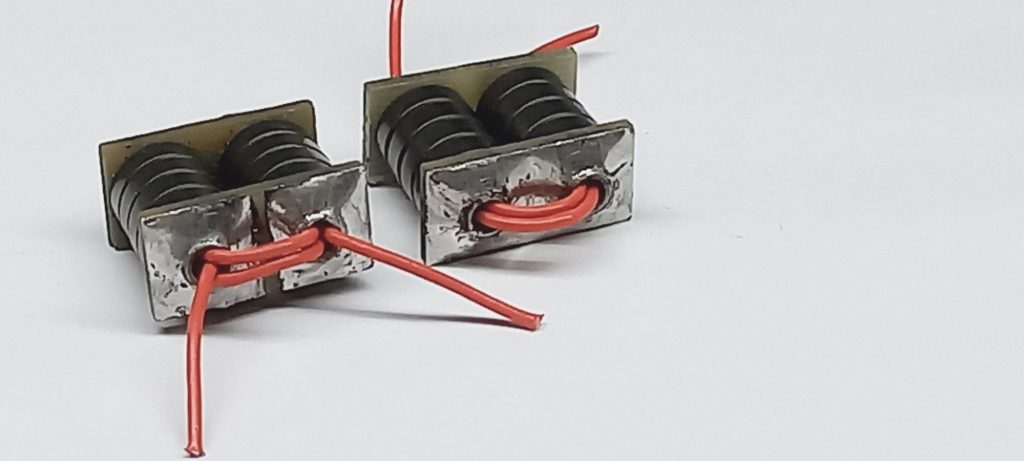
We build the transformer for the power amplifier using 8 ordinary FT37-43s. Two cylinders of 4 FT37-43s were formed by slipping them over copper tubes found in air conditioning and refrigeration works.

Both the cylinders are then soldered onto small pieces of copper clad board that short the tubes on one end keep them open on the other end, forming a single U-turn primary. The shorted end is used as a mid-point that feeds the DC power to the amplifier.

The two open ends of the primary are connected with very short wires/tracks to the IRFZ24N drains. Three turns of teflon wire is used as a secondary to multiply the low, drain-to-drain impedance of the power amplifier to 50 ohms. The picture wrongly shows only two turns of the red-wire as the secondary, it should be 3 turns.

The Digital Circuit

Before we discuss the details of the digital circuit,

AN IMPORTANT CONCEPT:

The left line input channel of the WM8731  is connected to the receiver preamplifier. The received signal samples at an Intermediate frequency of 24 KHz are captured by the codec’s left channel and transferred to the Raspberry Pi that does the SDR magic. The demodulated audio is then played back through the left earphone output. In effect, the left channel is used for receiver input and output.

The right line input channel of the WM8731 is connected to a mic amplifier. The microphone input samples captured by the codec’s right channel are transferred to the Raspberry Pi that performs the SDR magic. The modulated 24 KHz signal is played through the right earphone output. The right channel’s input and output lines are used for transmitter input and output.

Figure 7

The Digital hardware (Figure 7) consists of a board that takes the Raspberry Pi, the interface to the audio codec, has a connector for the front-panel jacks of microphone, keyer, headphones and a separate connector for the two encoders that control the radio.

The design centers around an inexpensive WM8731 audio codec that costs about 4 USD. It has a direct interface to the Raspberry Pi using an audio specific, high speed I2S bus. Briefly, the codec samples left and right channels, taking 96,000 samples per second in the range of +- 1V. Though it measures 24 bits of precision, most of the lower bits are noise. Only the upper 16 bits are effective, providing a dynamic range of about 90 dB. This is plenty more than our target of 80 dB of spur and overload free dynamic range.

The Raspberry Pi connector has a number of pins used like on the Arduino platform. Four lines from the Raspberry Pi interface with the digitized audio stream that comes in and out of the Audio codec WM8731 using a protocol called the I2S. You don’t have to understand the I2S to use the chip. These lines are on pins 12,35,36 and 40. Operating parameters of the codec like volume, gain, etc., are controlled with another I2C bus from pins 3 and 5.

Apart from these, the radio needs to control the Si5351 clocks, the low pass filters, switch the harmonic filters, turn transmission on and off. It also needs to sense PTT, keyer. The logical naming/numbering of the digital lines is different from their physical position on the Raspberry Pi’s 40 pin connector:

Physical Pin on the Connector Name Purpose
11,13,15 GPIO0, GPIO2, GPIO3 Input lines from the main tuning knob encoder and it’s push button
19,21,23 GPIO12, GPIO13, GPIO14 input lines from the function knob encoder and its push button
31, 33 GPIO22, GPIO23 Implements a separate bidirectional 2C bus to control the Si5351 (see text)
7 GPIO7 Push to talk input
29 GPIO21 DASH input line of the morse paddle, PTT is parallely used as the DOT line of the paddle
16 GPIO4 T/R output line
18,22,24,26 GPIO5, GPIO6, GPIO10, GPIO11 Output lines to select 1 of the 4 low pass tx filters
32,36 GPIO26, GPIO27 Extra I/O lines

The in-built I2C of the Raspberry Pi turned is used by the WM8731. It turned out to be finicky when connected to the Si5351 as well. Hence, a separate I2C bus was implemented on the GPIO lines 22 and 23.

On the Raspberry Pi 4, the internal pull-up resistors didn’t work as expected and external pullup resistors of 2.2K were connected between the PTT and DASH lines to the 3.3V supply.

Another quirk of the board was in the way the linux driver for the WM8731 is written. The recommended reference clock is 12.228 MHz but the driver works only with 12 MHz crystal. Hence, the WM8731 uses a 12 MHz crystal with its reference oscillator.

The Software

The sBitx software is especially written to be understandable, hackable and extensible. It is also constantly being updated. You can grab the latest version from https://github.com/afarhan/sbitx. There are accompanying notes in install.txt if you are doing a fresh install.
The core SDR routines rx_process() and tx_process() are really simple and easy to understand. We will examine them in a broad way but the best way is to just read the source code and ask questions about it in the bitx20 forum at https://groups.io/g/bitx20
Unlike the Arduino/Teensy programming, the sBitx works on a very powerful, quad CPU ARM core with graphics accelerator, etc. It uses all the power of such a powerful operating system to build a simple and straightforward code base where readability is preferred over speed and optimization.

This is a Convolution SDR, WHAT!

Imagine you have a direct conversion radio with an audio bandwidth of just 1 Hz. You have an extraordinarily long piece of paper to write things on and a magical junkbox full of VFOs that can be set to any frequency and starting phase.
You tune across the band, stopping at every 1 Hz and noting the DC signal’s strength and phase. You can now use this list of frequencies and their strength and phase to plot the spectrum on a piece of paper bins drawn in them. This is how conventional analogue spectrum analyzers work. To use the correct jargon, this process has converted the signal from time-domain into frequency-domain. We will also refer to each entry that you make in the list as a ‘bin’.
Let’s reverse this experiment. You have your bins of frequencies and the amplitude/phase at each frequency. And you have a magical junk-box in which you have an unlimited supply of VFOs that you can set to any frequency and starting position (phase). To generate the entire band’s signal back, you take one VFO at a time, set the exact frequency and phase as per your list and switch them on at once. Viola! you have lit up the entire band of signals recreated as it was in the written down list! Rather, you have converted the frequency domain signals back to the time domain.
In the above thought  experiment, note that not just the CW, every signal can be written down as a series of measurements of amplitude and phase at different frequencies and reconstructed back using a series of frequency generators.

The above process can be done, mathematically and hence on a computer as well. How does this help us in generating or receiving, let’s say an SSB signal?

Now, let’s imagine that there is an upper side band signal exactly at 14.150 MHz. We started measuring the signal from 0 Hz and continued until 14.200 MHz, we have effectively filled up 14,200,000 bins with information, in frequency domain. We took 14,200,000 precise measurements of how much the amplitude and phase was at every 1 Hz step. You will see the reading values starting with frequency 14,150,000 Hz going up depending upon the instantaneous  voice modulation of the incoming signal. By the time you reach 14,153,000 Hz, the signal strength would have dropped as the SSB occupies less than 3000 Hz bandwidth, you nevertheless continue your assigned job and reach 14,200,000 Hz. Stop, massage your hand and have coffee while staring down at your clipboard.

Now, we take a new clipboard and starting copying the bins into it but we start at the bin of 14150000 Hz and write the value of that bin as bin 0 on the new clipboard, we move to the bin at 14150001 Hz and write that down as bin 2 and so on. By the time we have written 50,000th bin on the new list, we have reached the end of the old list at 14,200,000 Hz. We continue to fill the rest of the bins in the new list from bin 0 of the old list and continue all the way up to the list’s bin of 140,149,999. The new list has all the bins and readings of the old list except that is is rotated around such that the first element in the new list corresponds to the 14,150,000th element of the old list.

Next, we will set about doing some slash and burn (also called filtering). We will zero all the bins except the first 3000 that correspond to our signal. This eliminates any signals apart from the specific 3 KHz slice that we are interested in. Also note that we have eliminated the other sideband. The lower sideband image of the signal would have been in the bins of the frequencies from 14147000 Hz to 14150000 Hz and along with all the other bins, those were turned to zero as well.

Now, we take this list of frequencies and set about our VFOs to correspond to each of them and power them up!

Your SSB signal is now translated to audio, the lower sideband is eliminated, the rest of the signals are filtered away.

Let’s see how this is practically implemented in sBitx.

Receiving single sideband, Convolution!

There will be a number of implementational details that any working code has that distracts from its core work, on the other hand, the sBitx core SDR is written to be understandable and hackable. So, we will skip a few things in the code on the first pass.
Right now, just remember two things:
1. The sbitx handles a block of 1024 samples at a time. As both channels (left and right) are running all the time, the function rx_process() is called with the next set of received signals from the receiver circuitry as well as the microphone samples. We just ignore the microphone samples while running the receiver code.
2. The frequency of any signal can only be known if it is a continuous sine wave. When we start and stop recording any signal there is an abrupt beginning and an abrupt end to it that confuses any mathematical operation. To smoothen this out, we process not 1024 but 2048 samples at a time. The first of these 1024 were what we received in the earlier call to the rx_process() to this we add the newly arrived 1024 and run the FFT over the combined lot of 2048 samples. This way the distortion from the abrupt beginning happens on the samples of the first 1024 samples. We are not bothered about the distortion in those first 1024 samples because they have already been processed earlier. We simply discard them. This technique is called overlap-and-discard.
Now, we can read the code and understand it quickly.

void rx_process(int32_t *input_rx, int32_t *input_mic, 
 int32_t *output_speaker, int32_t *output_tx, int n_samples)
{
 int i, j = 0;
 double i_sample, q_sample;

 //STEP 1: first add the previous M samples to
 for (i = 0; i < MAX_BINS/2; i++)
 fft_in[i] = fft_m[i];

 //STEP 2: then add the new set of samples
 int m = 0;

 for (i= MAX_BINS/2; i < MAX_BINS; i++){
  i_sample = (1.0 *input_rx[j])/200000000.0;
  q_sample = 0;
  j++;
  __real__ fft_m[m] = i_sample;
  __imag__ fft_m[m] = q_sample;

  __real__ fft_in[i] = i_sample;
   __imag__ fft_in[i] = q_sample;
  m++;
 }

// STEP 3: convert the time domain samples to frequency domain
fftw_execute(plan_fwd);

struct rx *r = rx_list;
 
//STEP 4: we rotate the bins around by r-tuned_bin
 for (i = 0; i < MAX_BINS; i++){
   int b = i + r->tuned_bin;
   if (b >= MAX_BINS)
     b = b - MAX_BINS;
   if (b < 0)
     b = b + MAX_BINS;
   r->fft_freq[i] = fft_out[b];
 }

// STEP 5:zero out the other sideband
if (r->mode == MODE_LSB || r->mode == MODE_CWR)
  for (i = 0; i < MAX_BINS/2; i++){
    __real__ r->fft_freq[i] = 0;
    __imag__ r->fft_freq[i] = 0; 
}
else 
 for (i = MAX_BINS/2; i < MAX_BINS; i++){
    __real__ r->fft_freq[i] = 0;
    __imag__ r->fft_freq[i] = 0; 
 }

// STEP 6: apply the filter to the signal,
for (i = 0; i < MAX_BINS; i++)
  r->fft_freq[i] *= r->filter->fir_coeff[i];

//STEP 7: convert back to time domain 
fftw_execute(r->plan_rev);

//STEP 8 : AGC
agc2(r);
 
 //STEP 9: send the output back to where it needs to go
 int is_digital = 0;

 if (rx_list->output == 0)
   for (i= 0; i < MAX_BINS/2; i++){
     int32_t sample;
     sample = cimag(r->fft_time[i+(MAX_BINS/2)]);
     output_speaker[i] = sample;
     output_tx[i] = 0;
   }
}

Open the file at https://github.com/afarhan/sbitx/blob/main/sbitx.c and scroll down to the function that says rx_process(). It might even help to take a print out of just this section to read along with the explanation here.

We start with Step 1 of first copying 1024 samples of the previously received samples into the array fft_in[] and in Step2 append that with samples passed from the codec as input_rx).

Now in Step 3, we simply called the excellent fftw library to convert all the samples to frequency domain. No, we didn’t have to write that code ourselves. the fft_execute() function sets the frequency domain data in the fft_out[] array.

The variable tuned_bin is the bin of the signal that we are interested in listening to.

In step 4, we fil another array called the fft_freq[] with the data from the fft_out[] such that the fft_freq[0] has the starting at the tuned_bin.

In step 5, we zero the other sideband.

In step 6, we apply filtering. This is interesting and unusually simple. Radio amateurs are used to looking at filter graphs where the frequency is on the x axis and the response is on the y axis. We have plotted the crystal filter and the low pass filter shapes above in this paper in a similar way.

For filtering in frequency domain, we make a filter shape out of a set of frequency bins. We set to zero all the frequencies that we don’t want to pass and ‘1’ for all the frequencies that we wish to let through. Making a filter this way is a bit crude because there are edge frequencies between two bins that can introduce  distortion in the filtered output. Hence, we apply a windowing function to smoothen out the filter edges, that source code is in https://github.com/afarhan/sbitx/blob/main/fft_filter.c . It was borrowed from Phil Karn’s excellent radio project at https://github.com/ka9q.

Each time the filtering setting is changed, we generated a new filter as set of frequency domain bin values.

Applying the filter is just a matter of multiplying the filter bins with the frequency domain signal bins. It is beautifully simple.
Our signals are now in the frequency domain, they are shifted to the baseband, filtering has been applied.
In step 7, we convert the signal back to time-domain so that they can be played by the codec.
In step 8, the audio’s amplitude is normalized in the function agc2() so that a strong signal doesn’t blow your eardrums. We will not cover it here except to say that the agc2 looks for the maximum amplitude in the block of samples; if it exceeds the previous maximum, the gain is set to bring it  down to a set level. The  gain remains ‘hanging’ even after the strong signal disappears while agc_loop counts down to zero. The agc response can be slow or fast depending upon the value set in the agc_speed variable.
That’s all there is to it.

Transmitting is just the reverse

The transmission process happens in tx_process() function. It is very similar to the rx_process() though in reverse.

The block of baseband audio samples previously received from the microphone and the currently received samples are all assembled into a bin of fft_in[] array, converted to frequency domain with fftw_execute() and the resulting frequency domain signal is filtered to restrict the audio to permissible bandwidth.

The bins corresponding to the opposite sideband are set to zero.

The bins are now rotated to bring the signal to the desired frequency and converted back to time-domain with another called to fftw_excute().

Optionally, on USB and LSB, compression is applied to increase the average transmitted power and increase the intelligibility of the signal.

The Modems (aka Waveforms)

The power of sBitx comes from being able to handle many of the digital modulation methods transparently. The sBitx uses the excellent fldigi for all the keyboard to keyboard modes (including CW decoding) and Karlis Goba’s FT8 library for FT8 (available at https://github.com/kgoba).

Rather than a line by line exposition of the way the code works, we will provide an overview so that those interested in adding more modes can use this as a guide.

There are many kinds of modems that are in vogue. Some process all the samples together in a bunch like the WSJT-X suite of protocols. Others like PSK31, RTTY or even CW (it is a digital mode!) are handled one sample at a time.

The external modems are interfaced with the main routines like the rx_process() and tx_process() by reading and writing from a second virtual sound card. We create the virtual sound card by running a linux utility called snd-aloop. It creates three virtual sound cards and we use two of them. These virtual sound cards are named plughw1, plughw2, plughw3. Each one of them further has two subdevices as 0 and 1. These are unfortunate names handed out by the Linux operating system.

Along with playing the audio to the speaker, the sbitx also plays to the virtual device plughw:1,0. During transmission, instead of reading from the microphone, the samples are read from plughw:2,1. This is done transparently in the sbitx_sound.c. Accordingly, the modem software (like Fldigi) should set their record device to plughw:1,1 and play device to plughw:2,0.

The interface to the modems is through a simple set of functions implemented in modem.c. The important one is modem_poll(). It is called a few times every second. It monitors any change in the modes, transition from transmit to receive etc.

The other is modem_get_sample() which is used to generate the required waveforms, one sample at a time. This may be studied for how CW is generated from keystrokes or the paddle.

The excellent suite of modems in fldigi, written by Dave W1HKG and his team is integrated with sBitx as slave. The sBitx controls the fldigi using its XML-RPC interface : changing modes, reading decoded text or sending more text from the keyboard. The audio samples flow to and from using the virtual audio cable as mentioned above.

For FT8, we didn’t use the WSJT-X, instead we used the command line encoder and decoder written by Karlis Goba. The samples are collected in subsequent calls to modem_rx() and on every 15th second, it is written into a file and decoded by calls to the command line utility ft8_decode, the text output is displayed on the radio’s console. For transmitting FT8, the text is submitted to gen_ft8 which produces audio samples. These are picked up every 15th second and transmitted.

The User Interface

  1. The user interface of the radio has to satisfy many conditions:
  2. 1. It has to be equally usable from the front-panel with the Tuning and Function encoders and touch interface or the keyboard.
  3. 2. The user interface is delinked from the core sdr and a wholly different user interface can be substituted. The core sdr receives commands as text strings through sdr_request(). Any alternate program can generate these instead of the sbitx_gtk.c that is currently available.

Simple and adaptable, portable

The User interface has to be quickly programmable by experimenters who just want to get it done rather than study how GUIs are written. The current GUI takes minimal help of GTK and using primitives to :
a) draw lines, write text and fill rectangles.
b) Be notified of mouse events and keystrokes
From these basic routines, we build our own user interface that consists of a single user interface element described in the struct field.
The struct field, whenever it is updated, in turn automatically calls the functions to be executed with the new value or actions. The struct field member cmd is the actual text command to be executed when the field is changed or touched. Most of these commands are directly passed to the core sdr. Some of the commands that implement functional on top of the core SDR (like macros, etc.) have an asterisk ‘*’ in the beginning of their command name.
Some fields are special (like the waterfall) and they have to be drawn differently. For those cases, the default handling of their corresponding struct field is over-ridden by providing setting the fn member to a function that will handle the events and provide a custom drawing routine.

Text friendly

The commands entered from the keyboard are executed by the function cmd_exec().

It should be fairly easy to port it to other operating systems like Microsoft Windows or the Macintosh.
The base system works on text commands that can even be passed through a primitive telnet like interface. This makes it easy to adapt this to smaller displays or even an eyes-free implementation for the visually challenged. On the other hand it is also easy to build a remote, web-based front-end for the radio.
It is hoped that these features will come in very soon.

Read The Fine Manual!

The list of features and commands is ever growing. It is best to periodically download the latest The Operating Manualversion from https://docs.google.com/document/d/1fQXQoQSHD_YDnZYGjL6JCdR8Klfg4KE-FuN-5BE1OSQ/edit?usp=sharing

Alignment

As it is all in the software and the frequency is determined by a TCXO, there is very litte alignment needed. You just have to set the bias for the driver and the power amplifier.

  1. Set the PA and drive presets to fully  counter-clockwise. Add Ampere meter (your VOM should have a 10A range) to the power supply to monitor the radio’s current.
  2.  Switch to either LSB or USB and press the PTT without speaking (silence!).
  3. Now, carefully turn the DRIVE bias preset clockwise until the current starts to climb, set it to an increase of 200 mA (100mA per transistor).
  4. Next, carefully turn up the PA bias preset clockwise until the current starts to climb, set ti an increase of a further 200 mA.

You are done!

Hacking and modifying the sBitx

Here is how you can get started with experimenting with the sBitx software. We will see how the sBITX is laid out and how to quickly start changing things. The latest source code can always be found on https://github.com/afarhan/sbitx.

Quick Start

If you received the sBitx as a ready-built system, you will find the source code in /home/pi/sbitx directory. To build the system you execute the batch file build as thus:

cd /home/pi/sbitx (to change to sbitx directory)

To build the radio,

./build sbitx (remember the dot before the slash)

To start the radio,

./sbitx

How it is laid out

The sBitx is all about being able to find your way in the weirdness of software defined radios, hence every attempt is made to keep it simple and quick to understand. We assume a minimum familiarity with the C language and being able to use a text editor. The idea is to make it easy to carry the system from platform to platform.

The big idea of sBitx is that is NOT  a phasing SDR. It is a superhet with first IF at 40 MHz that is downconverted to a second IF of 24 KHz. The 24 KHz IF is digitized through a high speed, low-noise audio codec. In this specific case, it is the WM8731.

In broad strokes:

  1. The core SDR is on sbitx.c and it has no user interface around it. It gets samples from the audio system and writes them back to the audio system. It accepts commands  to change modes, volume, etc., as text strings when the user interface calls sdr_request(). This is where the samples from the mic arrive, get processed and sent to the radio (when it is transmitting) or they arrive from the radio, get processed and sent to the speaker (when it is receiving). These two routines are rx_process()  and tx_process().
  2. We use convolution method to do the actual modulation/demodulation. It is much simpler to understand. It is best explained by Gerlad Youngblood, K5SDR in his seminal papers called A Software Defined Radio for the Masses. Read them here and here. Better yet, print them out and read and re-read them until you understand the concept. A few tricky details like save-and-overlap convolution or wrap-around with imaginary frequencies are not required knowledge to hack. If you insist, read them on https://www.dspguide.com/.
  3. We do our own GUI. The regular GUIs of Linux/Mac/Windows don’t quite work for radios. Each is pretty complicated as well. We also imagine that in the future someone might want to port the sBitx to an embedded system. Besides, most of us have no time to learn intricacies of GUI programming. Instead, we took the basic ability to draw lines, rectangles and text and built our own simple user interface. All that is in sbitx_gtk.c.
  4. It is written in simple C language. in a particular style of using all smalls as the names of functions and variables and it hasunderscore between the words (do_cmd() instead of doCmd or DoCmd). The lines are formatted such that they can fit into the 7 inch Raspberry Pi screen. We use the opening brace on the same line as the if or while statement to make efficient use of the 7 inch display of the sBitx.
  5. Stick to 2 spaces per tab, braces in the same line as the if or while statement. This is not religion but utility. The compact display of the sBitx can’t show too many lines. We follow the Linux coding style.

The Sound System

The details of sound sytem are all hidden in sbitx_sound.c. There are a few things to remember

  1. The sampling rate is fixed at 96,000 samples per second. Each sample read or written to the hardware is a signed 32-bit integer. The audio hardware works in full duplex at all times.
  2. The digital IF is centered on 24 KHz, staritng from 12.5 KHz to 37.5 KHz.
  3. The left channel is dedicated to receive. It gets its samples from the demodulator (Actually, the downconverter that moves the 40 MHz IF to 24 KHz, which is kind of “audio” range, handled by the audio codecs). After processing it writes the samples back to the speaker.
  4. The right channel is dedicated to transmit. It gets its samples from the mic, processes them and writes the transmit signal samples to the right channel.

The GUI

The GUI and other platform specific details are implemented in sbitx_gtk.c.

The GUI is build around a single structure called the field. This represents a single element on the screen (like the waterfall or a button)

struct field {
  char *cmd;
  int (*fn)(struct field *f, cairo_t *gfx, int event);
  int x, y, width, height;
  char label[30];
  int label_width;
  char value[MAX_FIELD_LENGTH];
  char value_type; //NUMBER, SELECTION, TEXT, TOGGLE, BUTTON
  int font_index; //refers to font_style table
  char selection[1000];
  int min, max, step;
};

The field cmd holds the text string that is to be sent as the command to the core sbitx. Many functions are not core to the sbitx. For instance, RIT (Receiver incremental tuning) is implemented as user-level feature that changes the core sbitx frequency between receive/transmit. The commands that are not to be passed to the core sdr are prefixed with a ‘#‘.

There are a few kinds of controls defined. All of them are in square boxes that can be easily touched by stubby fingers. These are the different kinds of controls

  • Button: These have no ‘value’ just a label (Ex: Close)
  • Selection: These can have one the selection of texts given in the selection field. All values are text strings, separated by forward slash’/’. (Ex: Mode selector)
  • Toggle: Essentially a selection with two values, when you click on it, it changes (like VFO A/B, RIT On/Off, etc.)
  • Number: Like a volume control or gain control. It can take any value between min, max in jumps of step.
  • List: This is takes a long text that is wrapped around or broken with new line characters. The text scrolls past.
  • Text: You can enter text in these fields

While the default drawing and editing of these are handled by draw_field() and edit_field() functions, They can be over-ridden by a user supplied function fn. If fn is NULL, the default behaviour happens. For instance, in the tuning control, the step size is determined by STEP control and the final frequency depends upon RIT, VFO A/B, the current state of radio (transmit/receive). Hence it is handled in the funciton do_tuning().

Every time a control is changed, do_cmd() is called as a clearing house.

All the GUI commands are also available as text commands that maybe entered from the softkeyboard or a physical keyboard plugged into the USB port of the sBitx.

Before you make  any changes

Save the current snapshot of the source code using the git like this:

git commit -a -m “Saving the original, just in case, hehe”

This command commits (saves) the current snapshot. The -a means all of it, -m says, a message is to remember what the commit is all about.  To see the history of all the previous commits

git log

This lists the last few commits, Each commit is listed with the comment as well as a unique checksum. To revert to a previous commit,

git  checkout [checksum] (You can specify just the first few letters of the checksum)

This is the shortest introduction to git, learn more from the Internet.

Debugging

We use the standard linux debugger gdb. You can read all about it in the manual (Run : man gdb). However, here is a quick start for those who don’t read manuals.

Start it like this:

gdb sbitx

To run the sbitx, type the command

(gdb) r (Run the program)

To set a break-point

(gdb) b sbitx.c:100 (Sets breakpoint when execution reaches a particular line)

(gdb) b rx_process (Sets breakpoin when the execution reaches the function rx_process)

To see a variable

(gdb) p last_mouse_x (Prints the value of the variable)

(gdb) p *f  (Prints the structure/variable pointed by f)

To step inside the function on the current line

(gdb) s

To step over the current line to the next

(gdb) n

To resume execution of the sbitx after watching/stepping past a break-point

(gdb) c

To see the stack of called functions (back trace)

(gdb) bt

To get out of the debugger

(gdb) q

Learning more

There are some really amazing resources online  to help you understand how SDRs work and in particular how the sBitx works. Here is a starting list :
K5SDR’s seminal papers in QEX. These are avaiable from https://sites.google.com/site/thesdrinstitute/A-Software-Defined-Radio-for-the-Masses
Bob Larkin’s QST papers describing the DSP-10 Transceiver, the inspiration for sBitx.
http://www.arrl.org/software-defined-radio
Phil Karn’s SDR receiver project from which much of the filtering code has been borrowed.
https://github.com/ka9q/ka9q-radio
Wes Hayward, Rick Campbell and Bob Larkin’s book Experimental Methods in RF Design. Now out of print, grab a copy. It has the most radio ham friendly introduction to DSP and SDRs.
Steven Smith’s amazingly direct and in-depth treatment of DSP stuff
https://www.dspguide.com/
Wes Hayward’s website for more details on the high dynamic range AF pre-amp and other filter related papers.
https://w7zoi.net

Adapting to your own circuits

It is hoped that this work will encourage others to adapt this software to more radios. Three things need to be changed:

  1. Route the digital I/O lines that flip between tx/rx, change the tx filters and sense the PTT and keyer paddle to your radio’s circuit.
  2. In sbitx.c, change the routine that sets the local oscillator to your radio’s way of doing it.
  3. Rewrite the audio loop in sbitx_sound.c to suit the audio hardware that you are using.

Acknowledgments

A project as large as this has many contributions. I would like to first acknowledge the guidance and encouragement I received from three principle contributors to this project, Bob Larkin, W7PUA, Phil Karn, KA9Q and Wes Hayward, W7ZOI for mentoring me and helping me with techniques, codes and circuits.

I am grateful to the initial guinea pigs for this project : Arun Kumar, W8ARU, Roger Hayward, KA7EXM for their feedback. As a developer one has a huge blindspot to the bugs and idiosyncrasies of the software and the radio.

A big shout to Dave, W1HKJ who’s team developed the fabulous fldigi that works in the background with the sBitx.

To my friend and daily ragchew partner, Raj, VU2ZAP for all his suggestions and quirky experiments.

Finally, my friends at Lamakaan Amateur Radio Club : Sasi, VU2XZ, Thomas, VU2TJ and others. It is amazing to have this bunch of homebrewers all in the town who are ready to come by, share components, indulge in days of unending testing without getting bored.

The colleagues at HF Signals, Anil, VU3DXA and Venu, VU2BVB who did extensive testing of the radio in every mode in every way in their spare time and many Sundays.

This is indeed a team project that spanned years of effort from everyone mentioned.

Hacking the sBITX

Here is how you can get started with experimenting with the sBitx software. We will see how the sBITX is laid out and how to quickly start changing things. The latest source code can always be found on https://github.com/afarhan/sbitx.

Quick Start

If you received the sBitx as a ready-built system, you will find the source code in /home/pi/sbitx directory. To build the system you execute the batch file build as thus:

cd /home/pi/sbitx (to change to sbitx directory)

To build the radio,

./build sbitx (remember the dot before the slash)

To start the radio,

./sbitx

How it is laid out

The sBitx is all about being able to find your way in the weirdness of software defined radios, hence every attempt is made to keep it simple and quick to understand. We assume a minimum familiarity with the C language and being able to use a text editor. The idea is to make it easy to carry the system from platform to platform.

The big idea of sBitx is that it is NOT  a phasing SDR. It is a superhet with the first IF at 40 MHz that is downconverted to a second IF of 24 KHz. The 24 KHz IF is digitized through a high speed, low-noise audio codec. In this specific case, it is the WM8731.

In broad strokes:

  1. The core SDR is on sbitx.c and it has no user interface around it. It gets samples from the audio system and writes them back to the audio system. It accepts commands  to change modes, volume, etc., as text strings when the user interface calls sdr_request(). In sbitx.c, the samples from the mic arrive, get processed and sent to the radio (when it is transmitting) or they arrive from the radio, get processed and sent to the speaker (when it is receiving). These two routines are rx_process()  and tx_process().
  2. We use convolution method to do the actual modulation/demodulation. It is much simpler to understand compared to a phasing system. It is best explained by Gerlad Youngblood, K5SDR in his seminal papers called A Software Defined Radio for the Masses. Read them here and here. Better yet, print them out and read and re-read them until you understand the concept. A few tricky details like save-and-overlap convolution or wrap-around with imaginary frequencies are not required knowledge to hack. If you insist, read them on https://www.dspguide.com/.
  3. We do our own GUI. The regular GUIs of Linux/Mac/Windows don’t quite work for radios. Each is pretty complicated as well. We also imagine that in the future someone might want to port the sBitx to an embedded system. Besides, most of us have no time to learn intricacies of GUI programming. Instead, we took the basic ability to draw lines, rectangles and text and built our own simple user interface. All that is in sbitx_gtk.c.
  4. It is written in simple C language in a particular style of using all smalls as the names of functions and variables and it has underscore between the words (do_cmd() instead of doCmd or DoCmd). The lines are formatted such that they can fit into the 7 inch Raspberry Pi screen. We use the opening brace on the same line as the if or while statement to make efficient use of the 7 inch display of the sBitx.
    Stick to 2 spaces per tab, braces in the same line as the if or while statement. This is not religion but utility. The compact display of the sBitx can’t show too many lines. We follow the Linux coding style.

The Sound System

The details of sound sytem are all hidden in sbitx_sound.c. There are a few things to remember

  1. The sampling rate is fixed at 96,000 samples per second. Each sample read or written to the hardware is a signed 32-bit integer. The audio hardware works in full duplex at all times.
  2. The digital IF is centered on 24 KHz, staritng from 12.5 KHz to 37.5 KHz.
  3. The left channel is dedicated to receive. It gets its samples from the demodulator (Actually, the downconverter that moves the 40 MHz IF to 24 KHz, which is kind of “audio” range, handled by the audio codecs). After processing it writes the samples back to the speaker.
  4. The right channel is dedicated to transmit. It gets its samples from the mic, processes them and writes the transmit signal samples to the right channel.

The GUI

The GUI and other platform specific details are implemented in sbitx_gtk.c.

The GUI is build around a single structure called the field. This represents a single element on the screen (like the waterfall or a button)

struct field {
 char *cmd;
 int (*fn)(struct field *f, cairo_t *gfx, int event);
 int x, y, width, height;
 char label[30];
 int label_width;
 char value[MAX_FIELD_LENGTH];
 char value_type; //NUMBER, SELECTION, TEXT, TOGGLE, BUTTON
 int font_index; //refers to font_style table
 char selection[1000];
 int min, max, step;
};

The field cmd holds the text string that is to be sent as the command to the core sbitx. Many functions are not core to the sbitx. For instance, RIT (Receiver incremental tuning) is implemented as user-level feature that changes the core sbitx frequency between receive/transmit. The commands that are not to be passed to the core sdr are prefixed with a ‘#‘.

There are a few kinds of controls defined. All of them are in square boxes that can be easily touched by stubby fingers. These are the different kinds of controls

  • Button: These have no ‘value’ just a label (Ex: Close)
  • Selection: These can have one the selection of texts given in the selection field. All values are text strings, separated by forward slash’/’. (Ex: Mode selector)
  • Toggle: Essentially a selection with two values, when you click on it, it changes (like VFO A/B, RIT On/Off, etc.)
  • Number: Like a volume control or gain control. It can take any value between min, max in jumps of step.
  • List: This is takes a long text that is wrapped around or broken with new line characters. The text scrolls past.
  • Text: You can enter text in these fields

While the default drawing and editing of these are handled by draw_field() and edit_field() functions, They can be over-ridden by a user supplied function fn. If fn is NULL, the default behaviour happens. For instance, in the tuning control, the step size is determined by STEP control and the final frequency depends upon RIT, VFO A/B, the current state of radio (transmit/receive). Hence it is handled in the funciton do_tuning().

Every time a control is changed, do_cmd() is called as a clearing house.

All the GUI commands are also available as text commands that maybe entered from the softkeyboard or a physical keyboard plugged into the USB port of the sBitx.

Before you make  any changes

Save the current snapshot of the source code using the git like this:

git commit -a -m “Saving the original, just in case, hehe”

This command commits (saves) the current snapshot. The -a means all of it, -m says, a message is to remember what the commit is all about.  To see the history of all the previous commits

git log

This lists all the last few commits, Each commit is listed with the comment as well as a unique checksum. To revert to a previous commit,

git  checkout [checksum] (You can specify just the first few letters of the checksum)

This is the shorest introduction to git, learn more from the Internet.

Debugging

We use the standard linux debugger gdb. You can read all about it in the manual (Run : man gdb). However, here is a quick start for those who don’t read manuals.

Start it like this:

gdb sbitx

To run the sbitx, type the command

(gdb) r (Run the program)

To set a break-point

(gdb) b sbitx.c:100 (Sets breakpoint when execution reaches a particular line)

(gdb) b rx_process (Sets breakpoin when the execution reaches the function rx_process)

To see a variable

(gdb) p last_mouse_x (Prints the value of the variable)

(gdb) p *f  (Prints the structure/variable pointed by f)

To step inside the function on the current line

(gdb) s

To step over the current line to the next

(gdb) n

To resume execution of the sbitx after watching/stepping past a break-point

(gdb) c

To see the stack of called functions (back trace)

(gdb) bt

To get out of the debugger

(gdb) q

Cascade Calculator

This calculator computes the intercept, noise figure and gain of cascaded stages of an RF circuit.

It is based on the calculations set forth in Fig 2.69 of Experimental Methods in RF Design (Hayward, Campbell and Larkin, ARRL)

This calculator was developed by Wes Hayward, W7ZOI, the lead author of the above book. He wrote the first version in the seventies and adapted to the PC for the EMRFD’s accompaying CD. My own implementation is independently developed from the descriptions in the above reference and from his other book Introduction to RF Design.

Though these books are now out of print, they are available for online purchase and highly recommended source for the RF experimenter.

1 2 3 4 5 6 7 8 9 10
Function
Gain
Noise Figure
OIP3, dbm

Bandwidth(Hz):

Total Gain, dB
Total Noise Figure, dB
IIP3, dBm
OIP3, dBm
MDS, dBm
Two-tone Dynamic Range, dB
Receiver Factor, dB

Bluepill setup on Arduino on Ubuntu linux

This is a work in progress.

  1. STlinkV2 adapter’s pinout on the plastic case is WRONG. the actual pin details are printed on the PCB.
  2.  I installed the stlink (the stlink should be added to a special group that allows access to the ‘modem’/’usb’)
    git clone https://github.com/texane/stlink.git
    cd stlink/build
    cmake ..
    make && sudo make install
  3.  We run lsusb. It didn’t work on USB 3.0 port.  The ST-Link shows up now when plugged into a different USB port as:
    farhan@Farhan:~/Documents/ham/stlink$ lsusb
    Bus 002 Device 001: ID 1d6b:0003 Linux Foundation 3.0 root hub
    Bus 001 Device 005: ID 06cb:00a2 Synaptics, Inc. 
    Bus 001 Device 004: ID 04f2:b604 Chicony Electronics Co., Ltd 
    Bus 001 Device 002: ID 046d:c534 Logitech, Inc. Unifying Receiver
    Bus 001 Device 020: ID 0483:3748 STMicroelectronics ST-LINK/V2
    Bus 001 Device 001: ID 1d6b:0002 Linux Foundation 2.0 root hub
  4. Started to install Arduino support for the blue pill :
    https://github.com/rogerclarkmelbourne/Arduino_STM32/wiki/Installation
  5. I tried running st-link from command line. It failed to enable it to find the libstlink,
    export LD_LIBRARY_PATH=/usr/local/lib
    sudo ldconfig
  6. Now, sudo stlink works!
  7.  Downloaded the bootloader from https://github.com/rogerclarkmelbourne/STM32duino- bootloader/blob/master/binaries/generic_boot20_pc13.bin as this has the LED on PC13.
  8. Next, we plug in the stlinkV2 adapter and probe for the chip ,then flash the progam into it.
    farhan@Farhan:~/Documents/ham/stm32$ sudo st-info --probe
    Found 1 stlink programmers
     serial: 2d0c02012612344d314b4e00
     hla-serial: "\x2d\x0c\x02\x01\x26\x12\x34\x4d\x31\x4b\x4e\x00"
     flash: 131072 (pagesize: 1024)
     sram: 20480
     chipid: 0x0410
     descr: F1xx Medium-density
    farhan@Farhan:~/Documents/ham/stm32$ st-flash --reset write generic_boot20_pc13.bin 0x8000000
    st-flash 1.6.0-392-g31b1fa1
    2020-06-30T15:42:38 INFO common.c: F1xx Medium-density: 20 KiB SRAM, 128 KiB flash in at least 1 KiB pages.
    file generic_boot20_pc13.bin md5 checksum: f6d7639c776ddc06d62a1b612ef7876, stlink checksum: 0x00192077
    2020-06-30T15:42:38 INFO common.c: Attempting to write 22268 (0x56fc) bytes to stm32 address: 134217728 (0x8000000)
    2020-06-30T15:42:38 INFO common.c: Flash page at addr: 0x08000000 erased
    2020-06-30T15:42:38 INFO common.c: Flash page at addr: 0x08000400 erased
    2020-06-30T15:42:38 INFO common.c: Flash page at addr: 0x08000800 erased
    2020-06-30T15:42:38 INFO common.c: Flash page at addr: 0x08000c00 erased
    2020-06-30T15:42:38 INFO common.c: Flash page at addr: 0x08001000 erased
    2020-06-30T15:42:38 INFO common.c: Flash page at addr: 0x08001400 erased
    2020-06-30T15:42:38 INFO common.c: Flash page at addr: 0x08001800 erased
    2020-06-30T15:42:38 INFO common.c: Flash page at addr: 0x08001c00 erased
    2020-06-30T15:42:38 INFO common.c: Flash page at addr: 0x08002000 erased
    2020-06-30T15:42:38 INFO common.c: Flash page at addr: 0x08002400 erased
    2020-06-30T15:42:38 INFO common.c: Flash page at addr: 0x08002800 erased
    2020-06-30T15:42:38 INFO common.c: Flash page at addr: 0x08002c00 erased
    2020-06-30T15:42:39 INFO common.c: Flash page at addr: 0x08003000 erased
    2020-06-30T15:42:39 INFO common.c: Flash page at addr: 0x08003400 erased
    2020-06-30T15:42:39 INFO common.c: Flash page at addr: 0x08003800 erased
    2020-06-30T15:42:39 INFO common.c: Flash page at addr: 0x08003c00 erased
    2020-06-30T15:42:39 INFO common.c: Flash page at addr: 0x08004000 erased
    2020-06-30T15:42:39 INFO common.c: Flash page at addr: 0x08004400 erased
    2020-06-30T15:42:39 INFO common.c: Flash page at addr: 0x08004800 erased
    2020-06-30T15:42:39 INFO common.c: Flash page at addr: 0x08004c00 erased
    2020-06-30T15:42:39 INFO common.c: Flash page at addr: 0x08005000 erased
    2020-06-30T15:42:39 INFO common.c: Flash page at addr: 0x08005400 erased
    2020-06-30T15:42:39 INFO common.c: Finished erasing 22 pages of 1024 (0x400) bytes
    2020-06-30T15:42:39 INFO common.c: Starting Flash write for VL/F0/F3/F1_XL core id
    2020-06-30T15:42:39 INFO flash_loader.c: Successfully loaded flash loader in sram
     22/22 pages written
  9. This concludes installation of the bootloader and any other program into the Blue pill if we already have a .BIN file. Whew!

Part 2 Setting up the Arduino IDE

Here, we will figure out how to compile our blink with an output to the USB’s serial port.

  1. The Arduino_STM32 folder has to be copied into a newly created ‘hardware’ folder inside the ‘Arduino’ folder in the home directory.
  2. We checked that lsusb lists the port as
    farhan@Farhan:~/Documents/ham/stm32$ lsusb
    Bus 002 Device 001: ID 1d6b:0003 Linux Foundation 3.0 root hub
    Bus 001 Device 005: ID 06cb:00a2 Synaptics, Inc. 
    Bus 001 Device 004: ID 04f2:b604 Chicony Electronics Co., Ltd 
    Bus 001 Device 002: ID 046d:c534 Logitech, Inc. Unifying Receiver
    Bus 001 Device 026: ID 1eaf:0004 
    Bus 001 Device 001: ID 1d6b:0002 Linux Foundation 2.0 root hub
  3.  Under tools > port, the Bluepill appears as /dev/ttyACM0 (Maple Mini)
  4. The blink was compiled, and uploaded through “STM32duino Bootloader” . The board had to be reset for it to be recognized, then it uploaded properly.
  5. Here is the test sketch (the potentiometer was connected to A7 and between GND and 3.3V).
    const int analogInPin = PA7; // Analog input pin that the potentiometer
     // is attached to
    
    const int pwmOutPin = 9; // PWM pin that the LED is attached to
    
    // These variables will change:
    int sensorValue = 0; // value read from the pot
    int outputValue = 0; // value output to the PWM
    
    void setup() {
     // Configure the ADC pin
     pinMode(analogInPin, INPUT_ANALOG);
     // Configure LED pin
     pinMode(pwmOutPin, PWM);
     Serial.begin(115200); // Ignored by Maple. But needed by boards using Hardware serial via a USB to Serial Adaptor
    }
    
    void loop() {
     // read the analog in value:
     sensorValue = analogRead(analogInPin);
     // map it to the range of the analog out:
     outputValue = map(sensorValue, 0, 1023, 0, 65535);
     // change the analog out value:
     pwmWrite(pwmOutPin, outputValue);
    
    // print the results to the serial monitor:
     Serial.print("sensor = " );
     Serial.print(sensorValue);
     Serial.print("\t output = ");
     Serial.println(outputValue);
    }
  6. The output came out on the serial port alright.
  7. While uploading be sure to press the RESET button the bluepill simultaneously with the upload button on the Arduino IDE, this will catch the bootstrap loader before the serial port opens itself up for debug messaging.

Step 3 – Measure the analog conversion rate

  1. The ADC example is on https://github.com/rogerclarkmelbourne/Arduino_STM32/blob/master/STM32F1/libraries/STM32ADC/examples/MultiChannelContinuousConversion/MultiChannelContinuousConversion.ino
  2. It needs to kickstart the conversion with a startConversion call:
    uint8_t pins[] = {PA7, PA6};
    const int MAX_SAMPLES = 8;
    uint16_t data_points[MAX_SAMPLES];
    
    void setup() {
     // put your setup code here, to run once:
     my_adc.calibrate();
    
    for (unsigned int j = 0; j <8; j++) 
     pinMode(pins[j], INPUT_ANALOG);
     
     my_adc.setSampleRate(ADC_SMPR_1_5);//set the Sample Rate
     my_adc.setScanMode(); //set the ADC in Scan mode. 
     my_adc.setPins(pins, 2); //set how many and which pins to convert.
     my_adc.setContinuous(); //set the ADC in continuous mode.
    
    //set the DMA transfer for the ADC. 
    //in this case we want to increment the memory side and run it in circular mode
    //By doing this, we can read the last value sampled from the channels by reading the dataPoints array
     my_adc.setDMA(data_points, 2, (DMA_MINC_MODE | DMA_CIRC_MODE), NULL);
     my_adc.startConversion();
    
    Serial.begin(115200); // Ignored by Maple. But needed by boards using Hardware serial via a USB to S
    }

Two Tone Generator

A two tone test generator is a very useful, simple circuit that you can build to test your circuits for distortion.

What is it

The principle is very simple, two crystal oscillators generate two signals that are close to each other. Both the oscillators are well isolated from each others output and then mixed together in a 6 db hybrid coupler. The combined output is filtered to remove the harmonics. Here is the circuit. It has just four transistors in it. You can build one in an evening.

How does it work?

Let’s imagine that the two crystals frequencies of your two tone generator (let’s call it TTG from now on) are 14 Mhz and 14.16 Mhz. They are have a difference of 160 Khz between them. If you feed the output of the TTG to an amplifier, you expect just those two frequencies to show up in the output. That only happens in an ideal world..
All real world amplifiers, mixers, even filters show distortion. The distortion will result in spurs (spurious signals) at 13.8 Mhz and 14. 4 Mhz as well.

Mathematically speaking given two signals are f1 and f2, the spurs will appear at 2f1 – f2, and 2f2 – f1.
These are called third-order distortions. We will deal with the math later. Enough to say for now that,

  1. You inject the two tones, each at -10 dBm into a circut.
  2. Measure the output tones. An amplifier will increase the output by it’s gain. In a test case, the amplifier output was +7dbm, the gain was 7 – (-10dBm) => +17 db
  3. Measure the tone to distortion ratio. In this case, the distortion product was at -23dBm. Which is 30 db below the tone ( +7dbm – (-23dbm) => 30 dB)
  4. The Third Order Output Intercept Point(OIP3) is output power + half of distortion ratio. In this case, it was +7dBm + 30dB/2 = +22 dbm.
  5. The Third Order Input Intercept Point(IIP3) will be input power + half of the distortion ratio. In this case, it was -10dBm + 30dB/2 = +5 dbm

Circuit

Each of the two crystal oscillators is a conventional crystal oscillator. The unusual part is that we take the output from a small (10 ohms) resistor that is between the crystal and the ground. This is a neat trick where we use the crystal as a crystal filter as well. This where the oscillator noise is the lowest. A small value (100 ohms) preset allows you to fix the exact power output at -10 dBm at the BNC jack.

The amplifier that follows is common-base amplifier, that provides very good input-output isolation. This is important as the outputs are mixed further down in the circuit and we don’t want one of the outputs leaking back into another oscillator and intermodulating it. We need almost zero inter-modulation out of this circuit so that the only intermods you can measure are from the circuit that this TTG will drive.

The 6 db pads at the output of the amplifiers provides stable driving impedance to the hybrid coupler. The hybrid coupler is deceptively simple circuit. It mixes the two oscillator outputs in such a way that there is (theoretically) no reflection from one oscillator output to another. If the hybrid coupler reminds you of a return loss bridge, your guess is correct (Not now, not now).

Any amplifier output has harmonics. These harmonics can interfere with the measurments. You can appreciate that if you remember that the third order intermods are caused by intermodulation of the second harmonic of one tone with another tone’s fundamental (2.f1 – f2). Hence, an extensive,  3 section Chebyschev low pass filter keeps the harmonics down.

As you can see, the circuit is more elaborate than two simple crystal oscillators with their outputs tied  together.  Test instruments can never be over-engineered. It is a good idea to throw as much effort and care into them as possible.

Construction

I constructed this in a small tin box that they gave on a flight with nuts in them. (No, not free, you have to buy the nuts). I built it ugly style using some stryoflex (also called polystrene) capacitors in the LPF The disc ceramics of the plain variety proved quite lossy.
Depending upon the crystals you have, you may have to change the low pass filter values. The ARRL Handbook or the Experimental Methods in RF Design (Also an ARRL publication) give you the formulae to do it easily.

Calibration

With SW1 switched off, only one oscillator will work. Connect the output to a 50 ohms load and with an oscilloscope probe, adjust the RV1 until the peak to peak RF appears to be 200 mV.

Now, switch on both the oscillators, and ajust the other oscillator until the combined peaks measure 400 mv. You adjustments are done. See the pictures. Keep the oscilloscope time base to about 1usec to get the peaks all bunched together. You can also see the two tones generating a PSK31 like waveform. The peaks are when the amplitudes add up and the nulls are where the amplitudes cancel out.

Doing it without a spectrum analyzer

The two tone generator assumes that you have a way of measuring the two tones seperately, that usually means a spectrum analyzer. But you can use your amateur radio receiver with a step attenuator. Here is how:

  • Turn off the AGC. It is a good thing that many homebrew receivers don’t have it to begin with!
  • Connect the two tone output of the circuit to the receiver through an attenuator. Keep the attenuation to at least 40 db or you will blow the receiver!
  • Tune to the spur. Note the speaker audio level with an oscilloscope.
  • Now, tune to the tone. It will be very loud. Keep flip on more and more attenuation until the tone is just as loud as the spur. Measure the audio level on the oscilloscope. Now, you have the IMD ratio. You can back calculate the OIP3.

The Mathematics

Given a signal x that goes into an amplifier, the output should y such that

y = ax (The ideal case, a is the amplification factor)

Instead, we get,

y = ax + bx2 + cx3 + dx4 ….

This is not nice. We would ideally like b and c and d etc. to be zero so that just get ax remains.

Our two tone generator helps in measuring the cx3. This is the most troublesome distortion because it produces spurs that are close to our signals. The spurs that are further away are filtered by the front-end filters or the transmitting low pass filters. Why is that so?

Let’s imagine that the signal consists of two signals actually: a and b.
Now, the term cx3 becomes c(a + b)3
If you remember your high school maths,

(a +b)3 = a3 + b3 + 3ab2 + 3a2b

The last two terms are multiplying the signals like : 3 . a . b . b and 3 . a . a . b
We know that when signals multiply, they generate ouptut frequencies at their the sums and differences.

Multiplying signals 3 . a . b . b will generate frequencies a ± b ± c which would be:

a – b – b = a – 2b (this is our offending spur)
a + b – b = a (doesn’t matter, it is just a)
a + b + b = a + 2b (this spur at 3 times the frequency, it will get filtered out)
a – b + b = b (doesn’t matter, it is just b, again)

and multiplcation of 3. a. a. b will produce the frequencies at a ± a ± b which will be:

a – a – b = -b (just b)
a – a + b = +b (just b, again)
a + a – b = 2a – b (this is the offending spur)
a + a + b = 2a + b This is three times the frequeniecs, it will get filtered out)

This is the horrible secret of the third order (beacuse it is the third term) distortion and why we struggle to overcome it. It can never be defeated but it can be controlled. Pour some more current into the amplifiers, Jake!


Specan – A Spectrum analyzer

Specan – A reboot of the W7ZOI/K7TAU

An easy to build spectrum analyzer for the homebrewers


Show me what you got!

For those who can’t wait to see the circuit diagram, here it is (the Arduino hookup is a little way down on the page):

Analog Circuit of the Specan

  • (A better, higher resolution diagram can be downloaded here: from my G Drive)
    If you don’t want to read this long long write-up, here is a summary:
  • This spectrum analyzer costs less than $100 to make.
  • It is just a superhet radio that has a log amp where the speaker should have been.
  • You can hack it. It has an Arduino.
  • Works as well as a commercial spectrum analyzer. In some ways, even better.
  • Works only upto 70 MHz (good enough for HF work, for VHF just remove the LPF)
  • It has just two resolution bandwidths : 300 KHz and 1 KHz. Quite enough for our kind of radio work.
  • You have to align the filters. Easily done, but still, you have to do it.
  • You use parts of the specan to align other parts. In this sense, it aligns itself!
  • Works with a PC instead of an oscilloscope for display.
  • It has a built-in LCD for quick readings
  • +15dbm IIP3, spur free dynamic range of 80 db at 1 KHz resolution, 70 db at 300 KHz.
  • Tunable in 100 Hz steps.
  • All under GPL v2.0 license.

Why do I need a spectrum analyzer?

Most of the homebrewers have a very basic measurement setup. Often we get by with just a VOM, an RF probe and maybe a frequency counter. The more ambitious experimenters aspire to acquire an oscilloscope – an expensive item. These instruments are quite useful but not enough for RF tinkerers.

Often times, we homebrewers end up using the following:

  • An RF Probe
    This costs nothing to make. Coupled with a dummy load, it can provide reasonable measurement of power levels of RF signals from a milliwatt upwards. But it offers no insight into the frequency of the RF signal
  • A Frequency Counter
    For a few dollars, we can program a PIC and an LCD display to display the frequency of an RF signal. However, the frequency counter does a very poor job. Imagine feeding a diode modulator’s output to the frequency counter. What would it read? the Modulation frequency? The carrier frequency? The upper side-band or the lower side-band? Your guess is as good as mine. When it comes to RF signals that have multiple frequency components like most of our RF circuits do, the frequency counter becomes useless. At best, you can use it to measure the frequency of your new VFO’s oscillations, but that’s about all you can do with it with any accuracy.
  • The Oscilloscope
    A few hundred dollars buys you an oscilloscope that can show you the exact waveform. Well, nearly exact. You could look at a sinewave and say that it is clean or not. But, consider this, a power amplifier with a second harmonic that is just 40 db down (and hence illegal to use on the air) will not register on the oscilloscope waveform at all. That is a variation of only %1 of the waveform from its expected shape. You won’t see that on your beloved ‘scope. You will more!

We, radio amateurs deal with signals in terms of their frequency spread. We talk about how much the carrier suppression is, how clean our signals are, how distortion free our receivers are. More often than not, we luck out with some circuits and fail to understand why others don’t work.

Enter the spectrum analyzer – it does the job of all the above and more. It unrolls even weak signal into its component frequencies and shows you the precise strength of each.

With it you can :

  • Show how well your DSB modulator is suppressing the carrier, down to 0.2db
  • Locate your VFO’s frequency and it’s cleanliness. With a little effort, even the phase noise.
  • Plot your antenna’s VSWR across the HF spectrum.
  • Check your QRP transmitter’s harmonics and other emissions.
  • Measure the input and output impedances, well actually, the impedance mismatch.
  • Measure distortion and overloading of the mixers, amps, receivers, transmitters.
  • Plot any filter’s passband shape.

The professional spectrum analyzers are quite expensive. The least expensive ones cost a few thousand dollars. The better ones cost tens of thousand of dollars. A few cheaper ones are now available – but they are more suited to tuning up commercial radios rather than lab quality work. The only alternative for the homebrewer is to brew their own.

We are fortunate! It is now possible to build one yourself for less than a hundred dollars in new parts. That’s a fraction of what an oscilloscope costs and it is entirely homebrewed.

If there’s one investment you need to make in test equipment, it is this. I didn’t know that until I built one.

The November 1998 QST carried an amazing series of articles by Wes Hayward, W7ZOI and Terry White, K7TAU. You can read them both here and here. They lay out the details of a spectrum analyzer that could be built at home. It is a classic. Even if you are not interested in spectrum analyzers, this series of articles forms the most compact introduction to high performance receiver design I have ever seen.

The W7ZOI/K7ATU analyzer made very intelligent trade-offs. It limited itself to HF work and it had just two resolution bandwidths. The 300 KHz bandwith is useful to see the entire HF spectrum to pick up spurs and harmonics and the 8 KHz bandwidth was for measuring IMD. This made the W7ZOI/K7ATU spectrum analyzer as complicated (or simple) as a simple SSB rig.

Almost 15 years later, I attempted to replicate their spectrum analyzer : improvising where I didn’t have the original parts and redoing others where newer technology was available. The really big change was incorporating an Arduino controller with an Si570 as the local oscillator. This article describes a new version of the W7ZOI/K7TAU spectrum analyzer, now simply called the Specan. I have included the small details that are essential to building a high performance spectrum analyzer.

The differences between my design and the original are as follows:

  • The local oscillator is an Si570. This allows us to tune finely down to 1 Hz steps.
  • Having a stable, finely tuned spectrum analyzer allows for very narrow resolution bandwidth. You can now measure the distortions inside the pass-band of a transmitter.
  • The Arduino also handles a front-panel LCD display and tuning knob making it useful as a measurment receiver as well.
  • Instead of an oscilloscope, the spectrum is plotted on the PC. This saves the cost of an oscilloscope.
  • The IIP3 of the Specan is about 10 db below that of the QST analyzer due to the ADE-1 mixers. However, narrower resolution bandwidth of 1 KHz gives us the desired 80 db spur free dynamic range for the close-in distortion measurments.

How it works

The Specan is actually a very simple but robustly built receiver. it is, in essence, a double conversion superhet receiver with 112 Mhz and 12 Mhz Intermediate frequencies. The first mixer uses an Si570 as the local oscillator. The second oscillator is a crystal controlled at 100 MHz; built with a common microprocessor crystal of 20 MHz. Unlike most radio receivers, the second IF has two filters : a narrow band crystal filter with 1 Khz bandwidth and a wide band LC filter with 300 Khz bandwidth. The detector converts the tuned signals into a log scale. The detector output is a decibel measure of the incoming signal.

The Specan is controlled with an Arduino board. The Arduino controls the Si570, handles the front panel, talks to the computer over the USB port, reads the detector and switches the filters.
In a very simple usage, the Specan can be tuned around like a regular radio. Instead of listening to the signals, you read their strength on the LCD display.

You can switch between wide and narrow filters : using the wide filters to hunt for signals and then use the narrow filter to locate and measure them with greater precision. This in itself is quite a useful function. It is possible to measure intercepts, gains and harmonics without using a computer.

Under a PC’s control, the Specan can be made to step through any sequence of frequencies and plot them on the computer screen. The Specan understands a handful of text commands sent over the USB port of the Arduino.

The Specan also accomplishes a long standing personal goal – to make the homelab at VU2ESE entirely homebrew. The Specan can easily replace our aging TEK 465 scope and do even more.

This Specan can be built for far less than hundred dollars. Though it needs quite a few evenings of work. Construction is straightforward.You won’t need any special tools. Modules of the Specan are used to align the rest of it! The Specan serves as its own set of test and alignment gear!
What you need to build one
The Specan must be built one stage at a time. Over evenings the builder will bring each stage to life. Each module is calibrated using the previously built modules. As high-performance is a requirement, each stage needs extensive shielding.

Though the circuit is only as complicated a simple transceiver, each stage has to be built individually, tuned up and shielded properly. It is all done quite easily. It just takes a bit of effort to take care of the small things and not rush through it. You are building an instrument that will last a long time. Take your time!

You will need temporary access to a well calibrated 10 Mhz receiver or a frequency counter for a calibrating the Si570. The rest of the tune-up is done by the Specan itself.

A plug for another piece of test gear that I designed – The Sweeperino I highly recommend building the Sweeperino. It consists of the three easiest to build modules of the Specan (the Arduino, the power meter and the Si570). Hook up these three parts as a digital controlled sweeper. The Sweeperino will help you align the Specan. It is documented here.

How well does it work?

It has an input intercept of +15dbm and a display range of more than 80 db at -20dbm level when scanning with the narrow band filter and 70 db with the wide band filter. It works from DC to 70 Mhz. This means that you will be able to see your HF transmitters harmonics even if they are 70 db below the carrier : quite a useful thing. You will be able to measure the IIP3 of mixers, amplifiers with a few simple attenuators. If all this is confusing, think this way : this equipment will be enough for you to design and measure the performance of all your HF rigs, antennas and linears.

How does it work?

The Ardiuno that controls the Specan is a very flexible microcontroller board that you can program in simple C language and download through a USB port from your PC. It costs just a few dollars. This build used a free version of it called the Freeduino. The Arduino provides four functions

Tunes the Specan by controlling the frequency of the Si570 as the local oscillator
Switches between the two IF filters of 300 KHz and 1 KHz under program control
Handles manual tuning, display and the function switch on the front panel
Communicates commands and data with the PC over USB in a simple text format

The rest of the Specan is just a receiver that covers from 0 to 70 Mhz in two bandwidths : 300 Khz and 1 Khz. Unlike a regular receiver that demodulates the signal to audio, the Specan converts the amplitude of the tuned signal to its decibal value through an amazing little 8 pin chip – the AD8307 from Analog Devices.
The Specan’s tuning is done by setting the 1st oscillator frequency. The first oscillator is another 8 pin chip – the Si570 that has a spur free, low phase noise output all the way to 200 Mhz. It costs less than 15 dollars here. The Si570 is in turn controlled by the Arduino through a two digital lines following a protocol called I2C. You don’t have to figure this out, Arduino and Si570 already understand it, we just hook it up and use it.

Here is the block diagram of the Specan, it is just a usual double conversion receiver

The incoming signal is filtered through a 4 section low pass filter before entering the 1st Mixer. We used a two dollar ADE-1 mixer from Minicircuits. You could choose a higher level mixer in it’s place, but this is what was available in the junk box so this is what was used. The 1st mixer is driven by a local oscillator that consists of the LVDS version of Si570 amplified by an MAV-11 MMIC. The mixer is followed by a strong amplifier (AMP1) that also consists of another MAV-11. This amplifier helps terminate the first mixer properly. (Yes, we did try bypassing this amp for the heck of it, it brought the input intercept down to 0 dbm, you could substitute it with a 6db attenuator pad with a drop in the noise figure). The AMP1 also provides a useful gain of 10db. The signals are then filtered through a band pass filter centered around 112 MHz and mixed in a second ADE-1 mixer (MIX2) with a 100 Mhz crystal oscillator. The output of the second mixer is in HF region, two low-cost 2N3904s are used in parallel as a high intercept post-mixer amplifier (AMP2). The 12 Mhz IF signals are routed through either a narrow band crystal filter or a wide band LC filter. The IF is amplified by the second IF amp (AMP3) to a level suitable for the AD8307 log detector. The AD8307 generates a DC voltage between 250mv and 2.2V as the log of the RF input with a 25mv per db ramp.

Building the Specan

(This photograph is with the shields removed. the Si570 shown here was CMOS version without the MAV11 amp)

Here are a number of things you must know before starting to build the Specan

  • The Specan is should be built on a large unetched board of 12″ by 12″. The original was built on a smaller, congested board.
  • Each module is assembled on smaller unetched boards and tested. They are tack-soldered onto the large board by small wires.
  • The front panel is also made of unetched copper clad board as well. The front panel is soldered to the base board.
  • Many of these modules need to be shielded. The original article recommended Hammond boxes for shielding. These are expensive. Instead, the Specan builds shields around each of the module by soldering walls of 1 inch high copper sheeting available in the hardware stores. The sheeting is easily cut with scissors.
  • A lid is fashioned out of more of the same sheeting and tack soldered to the walls of the shield. It works very well.
  • Many of the modules use SMD components. In the absence of a PCB, a hobby knife can be used to cut pads outof the un-etched double side copper clad board. The components are mounted between the pads and between the pads and the ground plane.
  • The ground plane on the top side is connected to the bottom plane by drilling a number of holes between them and soldering small pieces of wire.
  • Small pads are cut at the edge of the module boards for power and signal lines. The copper shielding has small apertures cut out to allow the lines through the modules. These apertures should be just wide and high enough to avoid shorting these pads to the ground. See the close-up pictures.
  • Keep the LM1117 regulator far away from the Si570 to avoid tempurature drift. Use a well regulated linear supply with the Specan.
  • In case you don’t hear it right that last point, let me repeat i: Use a separate, regulated, linear supply. DO NOT use the same power supply as the one for the device under test. I’d recommend building one inside the cabinet of the Specan. I didn’t do it and this build suffers from RF leaks when I accidentally use the same power supply for the units under test and the Specan.
  • Mount the LPF module such that the shield directly solders to front-panel to avoid picking up the RF from Arduino and the Si570 wires.

1 – Hooking up the Arduino

To use the Arduino in the Specan you don’t need to know any programming! You just download the Arduino code from the net and upload it to the Arduino.
We should all be very grateful for the Arduino board. It is a two dollar microcontroller on a board. The really amazing thing about the Arduino is that you program it in simple C language without messing about with assembly language. For writing these programs, a very easy-to-use IDE (Integrated Development Environment) is freely available from www.arduino.cc. The entire program of the Specan for the Arduino is available under General Public License. You can download it from https://github.com/afarhan/specan.
The Arduino has a two rows of female connectors on either side. Here is what it looks like:

The Specan uses Pin 2 to Pin 7 from the top row of connections and Analog pins 0 to 5 in the lower row (see the above picture). In addition to that, the USB port is used to talk to the PC. The Arduino is usually set to take power from the USB port. We want the Arduino to work even without a PC connected, hence we power it from an external 5v regulator. This is how you prepare the Arduino :

  1. Move the PWR jumper on the Arduino from USB to EXT.
  2. Mount the Arduino on one corner of the Specan’s box. Our Specan used 1/2 inch brass stand-offs to mount the Arduino.
  3. The mounted Arduino should have its USB port peek out of the front panel through a small aperture (to avoid RF leaks)
  4. The display should be mounted right on top of the Arduino so that the wire lengths are short.
  5. The Arduino takes a general purpose board with male pins that mate with the sockets on the Arduino. You only need two rows : for pins 2-7 and pins A0-A5. This general purpose board also has the 5v regulator for the Arduino.
  6. Solder or bolt a shield around the Arduino and the LCD display. A wall of thin copper sheeting (used in transformers) was soldered around the Arduino to prevent the RFI from the Arduino from getting into the rest of the Specan. Small apertures at the bottom of the shielding were left out to allow the control and power lines to run to the Specan.

Here is circuit for the Arduino’s interface with the Specan.

Once your Arduino is all wired up, you can load the Specan program into it. Here are the steps:

  1. Install the Arduino IDE on your PC from www.arduino.com.
  2. Download the specan.ino file from here.
  3. Connect an Arduino through the USB cable to the PC and power it up.
  4. From the Tools > Board choose the appropriate model of Arduino board that you have.
  5. From Tools > Serial Port choose the serial port of the Arduino.Choose the specan.ino from File>Open menu of the Arduino IDE and press the upload button.
  6. Keep the contrast control at the half-way mark. You may have to turn it up or down to get the LCD display going.

That’s all you need to do. The Arduino is now ready to control the Specan.
When you power up the Arduino you should see “Specan v0.2” show up on the display.

The Arduino controller is under the veroboard. The log amp is on the right

2 – Building the Si570 Oscillator (Use only the LVDS version!)

In many ways, the Si570 oscillator is a key component of the Specan.

  • It is a reasonably low noise oscillator
  • It is easily controlled by a microcontroller like the Arduino
  • It can be soldered dead-bug style just like an LM386.
  • It works into the UHF range!
  • Unlike a DDS, it has no spurs

The circuit is very simple. Two lines of SCL and SDA control are used to program the frequency from the Arduino. Beyond that, there are just the power and ground connections. However, to keep the noise and the spurs down, you need to take some precautions.

  1. Assemble the Si570 oscillator on a small one inch by one inch board.
  2. Solder the Si570 upside down. The chip is held in place by a very short wire from pin 3 to ground and the two powe supply bypass caps mounted as close to pin 6 as possible.
  3. Score off small pads (prehaps with a dremel) at the edge of the board to take in the lines from the Arduino and power.Make a separate pad for the RF out.
  4. Make sure that the power to the Si570 board is indeed 3.3v (and not 12v!).
  5. Mount the LM1117-3.3v regulator separately with sufficient heatsink. It will consume more than 1 watt of continuous power. The extensive bypassing on the power line of Si570 is to keep the digital noise of the Si570 from going out and the Arduino chatter from coming in.
    Strap down the wire bundles going to arduino and power with small loops of wire soldered to the board and twisted tightly. Keep them away and perpendicular to the RF signal paths.
  6. Testing the Si570 module
  7. Attach the wires to the Arduino, power line and switch on the two modules.
  8. Check that the pins 6, 7 and 8 report 3.3v.
  9. Load the Arduino with Sweperino sketch. Download it from https://github.com/afarhan/sweeperino
  10. Move the tuning knob around, you should see the frequency of the display change.
  11. Set the Specan’s display to 10.0000 Mhz
  12. Connect a frequency counter or monitor the output on a radio. Note the frequency. It will be close to 10 Mhz.
  13. Take the actual frequency measured by your counter/receiver and plug it into this formula: (10.000 x 114326895)/(Freq in Mhz)
  14. Now, open the Arduino’s sweeperino.ino and scroll down to the line that reads
  15. #define FREQ_XTAL (114326895) and replace the number with the newly calculated number (it should have 9 digits as well). Upload this file again
  16. Now, restart the Specan and tune up to 10 Mhz. The frequency should be spot-on in the receiver/counter.
    Now, open the specan.ino source code file and replace the #define FREQ_XTAL with the same value as above, upload specan.ino to the Arduino again.

Your Si570 is now frequency aligned and ready for use. The 6 db pad in the output provides a well defined 50 ohms output impedance.

The Si570 without the MAV11 (these pictures were taken before I switched to the LVDS version of Si570)

3. Building the 8307 Log detector

The Specan has to display the power of RF signals in decibel scale. A great challenge in building a spectrum analyzer is to build a perfect log detector that can convert the RF power to a dbm readings. This problem is now eased with the availability of the AD 8307. This part is available for a couple of dollars. It provides a 90 db range with 0.2db accuracy! It is pretty simple to make. Here is the circuit :

  1. Assemble the log amp in a small board using SMD components.
  2. Cut pads into the unetched copper to take pins of the AD8307.
  3. The regulator has to be on the board.
  4. Bring out the RF in, Output and the power lines to pads at the edge of the board.
  5. Solder a 1″ high ‘wall’ of copper sheeting all around the module, leaving small apertures for those tabs. A bit like dog flaps in the door.
  6. Now, power up the AD8307 and test it.
  7. With nothing connected to the RF input the output should read between 0.25v and 0.4v.
  8. Connect the AD8307 to Arduino’s pin A2.
  9. The Arduino should now start displaying the power readings.
  10. Connect the output of the Si570 with a very short coax to the AD8307.

Note the reading. The Si570’s output is around -3 dbm. The display will show different reading. Just note the difference and mentally add that up to the readings until we fix this specan.ino source code.


The AD8307’s power reading are un-caliberated at the moment, but our initial alignment only needs relative readings.

4. Filters – Building the 70 Mhz low pass filter


The Specan has a total of four filters that need to be carefully built and shielded. The 70 MHz low pass filter is the simplest of them all.
Each of the coils is made by winding 8 turns on 1/4-20 bolt as a former. Remove the former after winding the coild. They are best made with silver wire, we used 22swg copper wire in the prototype.

A strip of five pads is cut in a double side PCB. The coils are soldered across the pads. The capacitors are soldered between the pads and the ground plane. Keep all the caps on the same side of the strip. Drill a number of tiny holes on the PCB and solder small pieces of wire to extend the ground plane to the bottom side as of the copper clad board as well.
The entire filter is shielded and a each coil is shielded from the other as well.
Small flaps are left out on the two ends of the shield to bring the input and output to the other parts of the Specan.
The LPF filter can be tested easily with the Sweeperino

  1. Connect the sweeperino to the LPF’s ports
  2. Download the specan.exe from https://github.com/afarhan/specan-ui
  3. Now sweep the LPF with the specan.exe (See the videos for details on how to use it)
  4. Your LPF is now tested.


Note : the coils are shielded from each other. the final shield around the BNC connector is not shown here

5. Filters – Building and Aligning the VHF bandpass filter

The original VHF bandpass filter proved a challenge. The coupling called for gimmick capacitors that were difficult to setup properly. Instead, a simple to make VHF bandpass filter was designed using only fixed value capacitors. Here is the circuit:

The circuit is assembled on a double side, unetched board with seven pads of 0.2 inches each made in a row with a box cuttter. The 2.2pfs are soldered between every pad except the end pads that have 4.7pfs. The 10 pf capacitors are soldered between every pad and the ground. Keep all the 10 pfs facing one side. Solder the coils’ ground ends on the same side as well. All capacitors are SMD.
Shielding the VHF filter is very important. Solder the a 1 inch walls of copper sheeting or copper clad between the coils. Take care to cut small apertures in the bottom of the shield to prevent the copper pads from being shorted to the shield.
There were no 4.7pf capacitors in the junk box, we used two 2.2pfs in parallel.
Aligning the filter is not difficult at all.

  1. Connect the Sweeperino’s input and output together with a cable
  2. Enter “f112000000” (without quotes) on the Serial Monitor of Arduino’s PC software to set the Si570 frequency to 112Mhz. Note thpower reading on the LCD as the reference reading.
  3. Connect the filter to the Sweeperino.
  4. Desolder the ground end of L6.
  5. With a long nose plier, grab the ground end of L6 and drag it over the ground plane, expanding/contracting the turns for the best reading on the LCD display. Solder the ground end of L6 at the best spot.
  6. Repeat this with L7 and L8.
  7. Now solder the remaining side of the copper shielding around the filter.
  8. Run a full sweep of the filter from 70 MHz to 130 MHz with specan.exe

Your total filter loss should be less than 6 db compared to the direct reading of the Si570 at 112 Mhz.
This completes the alignment of the VHF bandpass filter.

6. Filters – Building and aligning the two HF filters

The wide HF filter uses 5 resonators. The inductors are wound on T50-6 toroids. They can also be air wound if the one can expend the extra effort of shielding them individually. We used a copper clad board about 4 inches long and 2 inches wide to accommodate both the HF filters and the switching relays. The entire module of HF filters is shielded with copper sheeting. There are two outlets at the two ends for input and output. The power and filter selection lines are well bypassed while bringing them inside the shield to prevent stray RF pickup.
This wide band filter is assembled on a single strip of pads cut into a copper clad board similar to the VHF band pass filter. Aligning them is similar. Set the Si570’s output to 12 Mhz with ‘f12000000’ command from the Serial Monitor and peak the output by moving the turns on each of the them for the best response.
The narrow band filter needs no alignment. Just use 12 Mhz crystals that were matched to within 100 Hz of each other. All the nine crystals need to be matched to each other. Solder the bodies of the crystal to the copper board.

7. The 100 Mhz oscillator

Building overtone oscillators has been a challenge in the past. This new design is based on the work of John Stephenson, KD6OZH in the QST of November, 1999. It is a very low noise oscillator – exactly what is needed to complement the low noise of Si570 in the first oscillator. This version oscillates very easily and without needing a coil in parallel with the crystal.
Tuning up this overtone oscillator is an old trick from EMRFD. Replace the crystal with a 22 ohms resistor in series with a 0.01 uf capacitor. Switch on an FM radio nearby and tune it to exactly 100 Mhz (use a radio with digital display). Compress and expand L10 until you can hear the signal in the FM radio (the signal will appear to make the radio dead silent). Tune the radio around and confirm that the peak of the signal (maximum quiteness) is at 100 Mhz. Now, replace the resistor and capacitor with the crystal. You should be able to hear the signal again. You might have to (very lightly) touch up the L10 for proper oscillations.

8. Building the IF strip

The IF strip has more than 35db gain. As the AD8307 has a response from 0 to 500 Mhz, the output of the IF amplifier has to be tuned to 12 Mhz. Set the Si570 to 12 Mhz and inject the signal into the IF amplifier. Peak the L17 for maximum response.

9. All together

Once all the filters have been aligned, bringing the Specan together is a fairly straightforward and simple job of hooking it all up together. The rest of the modules : the mixers and the amplifiers are all broad-band and simple to make. They don’t need as much shielding or alignment.
Check the full circuit diagram and the pictures for the parts layout.

10. Using the Specan

The video shows how it can be used as a stand-alone measurement receiver or as a spectrum analyzer. Briefly this is how the controls work

11. Manual operation

  • The tuning knob tunes from 0 to 100 MHz in 100 KHz steps.
  • A click on the function button switches between fine tuning and coarse tuning. The fine tuning tunes in 100 Hz steps.
  • Press and hold the function button to switch between narrow and wide resolution bandwidths.
  • Using the PC

    Connect the Arduino to the PC and fire up the specan.exe (Download it from https://github.com/afarhan/specan-ui.exe)
    From Action > Connect set the specan.exe to use the correct serial port of the Specan’s Arduino.
    Right click on the display to initiate a scan. The initial scan is set to 30 MHz sweep centered at 30 MHz (a total scan from 0 to 60 MHz)
    Moving the cursor over the display measures the exact power level at the frequency under the cursor
    You can left-click on any part of the display and choose a different sweep range to view that part of the scan better
    There is a feature to place a ‘mark’ on a particular store a particular reading (like a maxima or a minima). The specan.exe displays the difference in frequency and power of the reading under the cursor and the previously marked reading
    To capture a screenshot, press PrtScr key, open up your favourite paint program and paste the captured screen shot!

    11. Final alignment

    There are two independent calibrations to be made for the Specan.

    A. The power caliberation
    The two HF filters have different losses. Each of them has to be calibrated separately. The values of #define NB_POWER_CALIBERATION and #define WB_POWER_CALIBERATION need to be tweaked to get the power readings aligned properly. You will need a “calibrated signal source”. I just used a crystal oscillator for which I measured the output into a 50 ohm resistor with an oscilloscope.

    B. Frequency caliberation
    Connect the spectrum analyzer to an oscillator with accurately measured frequency. Initiate a scan with the narrow band filter selected. If the signal shows up at a different frequency on the Specan, adjust the #define IF_FREQ of specan.ino by the difference in between the Specan reading and the actual frequency of the oscillator. Save specan.ino and upload back to the Arduino.

    Wrap-up

    I have provided this rather extensive documentation of this spectrum analyzer in the hope that many will try building it. In spite of its seeming complexity, it is in fact a quite straight forward circuit. For those of us who build our own rigs (and especially those who build multiple radios), a spectrum analyzer is a worthy instrument to build.
    As useful as it is to have one in the lab, the building the specan has been a great education in construction of high performance general coverage rigs (the specan is a pretty decent receiver if you substitute an audio chaing for the log amp). So, if you have built a superhet in the past, this should be your next project. And don’t worry about the software part! it has all been worked out.

    About the software. It is a little kludgy but it does what I wanted it to do. I had never used a spectrum analyzer before so I don’t know what a ‘real’ one does. I made it to my requirements. Feel free to download and modify. I can immediately think of having two separate knobs for coarse and fine tuning, a switch for selecting the narrow and wide filter. On the PC side, the connect dialog should only list the serial ports that are ‘live’. I hope someone hacks that for us. I’d prefer the PC software to be not written in C at all. It is possible to write it entirely as an app for a smart phone. That would clear up the PC from my bench!

    Support

    No PCBs are available for this build (yet). If any kit supplier would like to offer them, please drop me a line. Join the EMRFD group to discuss the design.

    This project wouldn’t have happened if the original hadn’t been designed by Wes and Terry. Over the last two years, Wes and others have mentored with this project. I am deeply indebted to William Meara for two reasons : For proof-reading this write-up (which is easy for him to do) and to keep it under wraps until I had it all sorted out (which is difficult for him to do given his gossiping ways at soldersmoke podcast!)

A Simple Dual-band Transceiver

A dual-band transceiver with a crisp receiver and a clean SSB signal is described. It started its life as an investigation of the excellent S7C receiver described in EMRFD.
This transceiver was specifically designed to use components that are easily available in TV and Radio spares shops. The receiver sports an above average dynamic range, very clean signal and noiseless performance. Although the components are easily available, and every detail about making it is covered here, this is not a weekend project. The design is elaborate and invites improvisation.

We decided to pursue the following rules in designing this transceiver:

  • Use what is easily available. Very often, we find designs that look good but they use exotic parts like TUF-1 mixers that are simply impossible to get hold of in India and other countries. Instead, we have tried using those spares that are universally available.
  • Keep impedances and gain low: Often, we try coaxing maximum gain out of a stage making it difficult to duplicate and stabilize. We chose to take only modest gain out of each stage, using extensive feedback to make the circuit stable. Most of the interconnections between modules are for 50 ohms termination. In fact, the rig was a number of discrete board connected using RCA audio cables and sockets before we hooked it all up together to work.
  • No PCB. We directly solder the components over a plain copper clad board (un-etched PCB). It is an excellent way to experiment, physically robust and has a quick and dirty appeal. You can usually solder up a whole circuit as you think it out in a few minutes. See the pictures.
  • Broadband. We wanted to be able to use broadband design where applicable. We have found that the television balun cores are an excellent and very cheap (about Rs. 2 per balun, that is 5 cents) way of making broadband transformers.
  • Modest cost. While we didn’t want to use very expensive components. We didn’t want to compromise the performance either. You will see that we have used 2N3866 exclusively. This was because we found that the BF195/BF194/2N2222 series transistors available in the market were consistently inferior in the HF range and performed below their stated specs. The 2N3866 is commonly used in cable TV equipment and has a good HF performance: both as a low noise small signal transistor as well as driver up to 1 watt level. 2N3866 is expensive (about Rs.20 each, but well worth the expense). It is used in a number of critical places.
  • Measure what you have built. We used a 12 volt 1.5A power supply, a frequency counter, a test oscillator (to measure the crystals and coils) and a high impedance voltmeter with an RF probe to test and measure the design. All these test equipment were homemade. The transmitter design did require a PC-based oscilloscope. It helped us identify the spurs and harmonics using the in-built FFT functionality. But now that the design is complete, just an RF probe and a 14MHz receiver are enough to align the rig.
  • Quality over quantity. A better signal is preferred to a bigger signal. This is a 6 watt design that will work off a simple 12V, 1.5A supply (using a single 7812).

    The ladder crystal filter

    A good filter is central to the crispness of a receiver and the quality of the transmitter. There are two types of crystal filters possible, the lattice filter and the ladder filter. The lattice filter requires ordering crystals with 1.5 KHz frequency difference between them. This was ruled out, also procuring readymade filters from BEL India and other sources was ruled out as it is too expensive to do that. Instead, a ladder filter was chosen. The ladder filter offers results as good if not better than a lattice filter. However, the design is crucially dependent upon internal parameters of the crystals used. It is not possible to suggest any generic values for the capacitors to be used in the ladder filter. Rather, a method to measure each of the crystals and calculate the capacitor values has been worked out. We present this here. This design procedure will work only for 10 MHz crystals. 10Mhz is the chosen IF of our filter as the crystals are easily available and it sits comfortably between 7 and 14 MHz amateur bands. We have followed the Butterworth design methodology given in the new ARRL book Experimental Methods in RF Design.

    The circuit centers around a four crystal ladder filter. Each lot of crystals from each manufacturer differs from the others. We will describe a way to experimentally calculate the values of the capacitors for the filter. You should probably buy 10 crystals and select 5 of them.

    For this purpose, we used a simple clever technique of measuring the motional parameters of the crystals. This technique has been developed by G3UUR. It works as follows:

    Construct the test circuit of figure 1. This is a simple Hartley-style crystal oscillator. You will require access to either a frequency counter or a general coverage receiver (ask a neighborhood ham to allow you to bring over your crystals to his shack and test them for few minutes). Mark each crystal with a number and solder it into the circuit (don’t use a crystal socket). Connect the 9 volt battery and measure the frequency. If you are using a receiver, find out the frequency on which the crystal is absolutely zero. Note the frequencies with the 33 pf capacitor in series and shorted. You will have a pair of frequencies for each crystal. Select four crystals with pairs of frequencies that match within 50-40 Hz of each other. A fifth (for the carrier) oscillator crystal should be within 100 hz of the other four selected.

    Calculate the value of the capacitors of Fig.2 like this:
    1. Calculate the average frequency shift of the four chosen crystals as F (in KHz).
    2. C1 = 21 * F, C2 = 40 * F. Choose the nearest available fixed capacitor. If you can’t find a fixed capacitor within 10% of this value, then parallel two capacitors to achieve the capacitance.
    For instance, in the case of the first prototype, we measure an average of 5KHz of shift. Thus, the capacitors calculated were 107pf and 200pf. We used 100pf and two parallel 100pfs as a substitute for 200pf capacitors. These calculations are for 200 Ohms termination. For a complete discussion of this design method, you are referred to the excellent paper by Carver in the Communications Quarterly of 1993, Winter.

    Broad-band design without Toroids

    It was decided to use broad-band techniques where suitable and keep the circuit free of too many critically tuned circuits. We decided to investigate the TV baluns as cores for broadband transformers. The TV baluns are small ferrites as shown in the picture.


    Almost all the broadband transformers are bifilar. Two (the modulator and the transmit mixer cum product detector) are trifilarly wound. They are simple to produce.

    (The small board holds a Double balanced diode mixer using the baluns, an unwound balun is shown next to it. the coil former in the picture is the one used throughout my projects).

    Making a bifilar transformer:

  • Take two lengths of 36 swg copper enameled wire.
  • Hold them together. Tie one end to a nail.
  • Twist the wires together so that they cleanly have about 8-10 turns per inch.
  • Check that the wires are evenly twisted (although there will be more twists towards the ends).
  • If the balun core is mounted on a PCB, cut it out with a cutter and remove all the original windings.
  • Pass the twisted pair through one hole to the other side, bend the wire back and pass it back through the other hole (like a U turn). This is one turn, like this, make similar 10 turns.
  • Cut out the remaining ends of the windings leaving about half an inch of the twisted pair on each end.
  • Scrap the enamel off to about quarter inch, and tin the leads.
  • Using a VOM at low ohms setting, identify the two separate windings of the twisted pair. If we call the two wires X and Y, each will have two ends A and B. This you will have four ends AX, BX, AY and BY. Short AX and BY together and use this as the center point of the transformer in the circuits. Use AY and BX as the two opposite ends of the transformers.Making a trifilar transformer is similar, except that you have to use three wires twisted together. Separate out the three wires as before, use the first two as described above, and the third winding as the secondary.

    IF sub-system

    The crystal filter and its associated IF circuitry is shared between the receiver and transmitter. Although the crystals are inexpensive enough to be able to afford separate filters for the transmitter and the receiver, we noted that each filter would have a different center frequency. This would make zero-tuning difficult for SSB operation. Therefore, it was decided to share the same crystal filter, carrier oscillator and the VFO between transmit and receive functions.

    The crystal filter requires 200 ohms impedance matching at both ends to provide the correct bandwidth and low ripple. A regular practice among hams is to strap a resistor of approximately the same value as the terminating filter impedance across the input and output ends of the filter. This is incorrect. This looks like a resistor that is paralleled with a reactive impedance of the rest of the circuitry attached to the filter. When the crystal filter is not properly terminated and sees reactive termination, ripple and ringing are introduced. This will spoil the crispness of the receiver and spoil your on-the-air quality.

    The crystal filter is terminated on both sides by strong RC coupled amplifiers based on 2N3866. This is slightly unusual. The 2N3866 is used mostly as a VHF power amplifier. It has excellent low-noise characteristics, good gain and using it as a small signal device is now an established practice. The 2N3866 is an expensive transistor. It costs about Rs.20 in the open market. We think it is a good investment.

    Using RC coupled broadband amplifiers makes the IF system a no-tune affair. The output of the post-filter amplifier is coupled to a two diode mixer. The two-diode mixer uses a broadband bifilar wound transformer. It is next to impossible to get toroids in India. We have evaluated using TV baluns as substitutes for toroids. These baluns are available at most TV spare shops.

    Most designs we have studied couple the RF input to the diode detector through the transformer and inject the BFO at the center of the transformer. This is a wrong practice. The diode mixer requires a minimum of 5mW of energy from the transformer input to operate properly. There should be enough energy to switch on both the diodes. This means about 1.2 v peak voltage. The received signals are rarely this level. As a result, the product detector operates like a regular envelope detector and the diodes act as distortion devices to mix the BFO with the signal. The correct configuration is to inject the BFO across the transformer

    An unusual approach is taken here. The IF amplification gain is just enough to maintain good noise figure and recover the losses in the ladder filter. We measured almost 10 dB loss in the filter.

    The Receiver

    The receiver is minimal. By keeping the number of active devices low (3 devices between the antenna and the audio amplifier), very good fidelity is achieved. The circuit is kept at a low impedance and broadband everywhere except the front-end. This helps in stability.

    The front-end uses a low-noise FET. We have used a BFW11 (because the local component shop ran out of BFW10). They have slightly different characteristics. Almost any FET can be used if it is biased properly. The FET should be biased for exactly half the pinch-off voltage. Wes Hayward (W7ZOI) has described the proper way to bias a FET Mixer for proper operation.

  • Short gate and source and measure the current that flows through a 560 ohms resister connected to +12V through the drain. This gives the exact Idss.
  • Place a 10K resistor between the source and the ground. Keeping the gate grounded and the drain still connected through the 560 ohms resister, measure the voltage between the source and the ground. This gives you the pinch-off voltage.
  • The FET has to be biased such that the voltage on the source is exactly half the pinch-off voltage and there is half of Idss current flowing through the FET.Such a scheme assures you that the FET is driven between pinch-off and maximum drain by the VFO injected at the source. This gives the proper switching action for the mixer to operate as well as maximum gain. We measured the pinch-off voltage for BFW11s as 2.1 volts and Idss as 5mA. A standard 1K resistor at the source gives the proper bias.It should be noted here that we first tried a double balanced diode ring mixer at the front-end. It has a number of spurious responses that literally made it impossible to use the receiver. We tried to properly terminate the diode ring mixer by inserting attenuators between the mixer and the Ladder filter’s pre-amp. It didn’t cure the problem. When we changed to the FET mixer, the noise figure improved, the receiver’s dynamic range, while unmeasured, was never found lacking in the last one month of extensive usage at VU2PEP.The output of the IF amplifier is detected in a balanced detector using just two diodes. Here gain, we break a common myth. You will see most of the HF receivers employing a two diode balanced detector with the BFO fed to the center tap and the incoming signal applied through the primary winding of the detector transformer. This is wrong. The signal applied through the primary winding should strong enough to switch the diodes on and off (requiring about 0.6 across each diode, that is, 1.2 volts across the winding). This roughly translates to about 5 mW power. The diodes switch the low level signal coupled at the center-tap of the coil to the detector output. Therefore, in our design we have applied the local oscillator through the primary of the transformer and the incoming signal from the IF stage to the center tap.

    There is a 100 ohms preset used to null the local oscillator from appearing at the output. This is of importance during transmit where the balanced detector also doubles up as the transmitting mixer.

    An audio pre-amplifier follows the detector. The capacitor of 220 pf between the base and the collector ensures that the hiss is kept down. The audio amplifier used is an LM380. Almost any audio amplifier can be used. We have tried everything from the PC’s ampli-speakers to a Sony amplifier to a TBA810 amplifier. We would recommend using a high fidelity, low cost amplifier like the TBA810 if you plan using a speaker. If most of your work is with headphones (to save your companion from the late night QRM), we recommend the LM386.

    The Transmitter

    The transmitter starts with the modulator using a 741. There is a three resistor network that biases the electret microphones. We use a Phillips “walkman” style headphone with built-in microphone for our work. The electret microphone requires a bias that provides 5V as given by the circuit.

    The balanced modulator also had two 22pf trimming capacitors for nulling the carrier. They were later found unnecessary (as long as both the diodes are purchased from the same roll) and removed. If you do find balance a bother, feel free to add a 22 pf trimmer to one side and a 10 pf fixed to the other side as indicated in the schematic.

    The output of the balanced modulator is routed to the common IF amplifier through a buffer amplifier using a BF195. This serves to keep the carrier leak from the modulator out of the IF string during the reception mode.

    The balanced detector of the receiver also doubles up as a mixer during transmit. It is important to balance out the VFO energy at the output by setting the 100 ohms trimmer properly. We noticed a 50mW residual out-of-band output from the transmitter when the VFO is unbalanced.
    The power chain is an interesting broad-band amplifier. You can use this in virtually any transmitter of up to 7 watts (and higher with more than 12 volts supply to the final stage). Three stages of broadband amplifiers feed an IRF510 PA. It is an interesting twist that the driver 2N3866 transistors cost more than the IRF510! The IRF510 should be biased for 80mA of standing current during transmit with the microphone disconnected (no modulation) and carrier nulled by the trimpot of the balanced modulator.

    Construction

    We heavily recommend constructing over pieces of un-etched PCBs. They are cheaply available everywhere. See the pictures as a guide to component layout. We recommend the following rules:

  • Keep your leads short. Short connections are more important than components that are at right angles to each other. What might look neat to you might look unstable to the RF design.
  • Keep the outputs and inputs isolated from each other. We have taken care to keep the high impedance points down to a minimum. But still, maintain design hygiene.
  • Make one module at a time, test it completely, then move to the next one.Construct the transceiver in the following steps:
  • Make the VFO. Check the RF output using an RF probe. Check the stability on a regular receiver or a frequency counter. With the tuning capacitor fully closed (the plates inside each other), set the trimmer so that the VF0 frequency is exactly 3.9995 MHz (keep 5 KHz margin at the band end)
  • Make the BFO. Check the output on the RF probe.
  • Calculate the ladder filter values and make the IF strip along with the audio preamplifier.
  • Connect the BFO, VFO, IF strip and an external audio amplifier together. When you power on and attach a piece of 2-3 meter long wire to the input of the IF amplifier you should be able to hear the atmospheric noise. Tune the BFO coil by fully screwing the slug in and then slowly tuning it out until the IF noise sounds right (not too shrill and not too muffled).
  • Wire up the receiver mixer, connect the VFO. Peak the mixer output and the RF input coils for maximum output. Then tune to a weak signal on the band and tune for the best signal. Be careful to tune for best quality of signal and not for maximum loudness.Take a break, spend a day or two listening to the band with your receiver. Nothing is more enjoyable than using a crisp receiver that you have homebrewed.
  • Wire up the modulator. If you have an oscilloscope, you can check the modulation. The modulated output will be too low for you to be able to measure on the RF probe.
  • Wire up the linear chain. DON’T solder the IRF510 yet.
  • Put the transceiver in transmit mode. Whistle into the microphone and peak the transmit mixer output coils for about 6 volts peak RF voltage on the probe at the 56 ohms resistor where the gate of the IRF510 would be.
  • Solder in the IRF510. ATTACH A DUMMY LOAD. We used four 220 ohms two watts resistors paralleled together.
  • Keep the bias trimmer totally down towards zero. Attach VOM in series with point X in the power amplifier. Apply power in transmit mode and slow increase the bias until you have 80mA flowing through the IRF510.
  • Connect the RF probe across the dummy load.
  • As you whistle, You should get about 20-24volts of peak RF on the probe. When you pull out the microphone from the jack, the RF output should drop to complete zero.What if your transmitter is unstable?
    • Don’t curse your fate. All transmitters start out as unstable beasts. Relax.
    • Start disconnecting power from the stages starting from final IRF510 and working backwards. When you have located the unstable stage, there are a number of things you can do to fix it.
    • Try increasing the value of the 10 ohms resistor used in the emitter degeneration OR
    • Strap a resistor of about 1K across the output transformer of the unstable stage to ‘load’ it.
    • Move the linear amplifier away from the rest of the circuitry.
    • Redo the board. This time spread the stages out. We guess that the linear chain should occupy about 6 inches of space, all laid out in one line.

    Substitutions

    The BF195 transistors can be substituted with any other HF transistor like 2N2222 etc. The 2N3866s are best not subsituted. The circuit works with slight increase in the noise figure if BF195 or equivalents are used in place of 2N3866s in the IF stages. The output power on the transmitter absolutely needs the 2N3866s. Subsituting them with other switching transistors didnt give good performance.

    The IRF510 should not be subsituted with any other transistor. The other IRFs, though rated higher, have higher input capacitance which makes them a bad choice for 14MHz operation.

    The LM380/LM386 can be subsituted with almost any other audio amplifier. Our first amplifier were Cambridge SoundWorks Sound System. If you turn down the bass, they are an excellent system for the shack. We have tried a TBA180, an LM386, an LM380 and even a glow-bug guitar amp. Feel free to experiment.

    Final Notes

    The first contact we made using this rig was DF6PW. He reported us 57. Within the first evening we had worked four continents. The rig was regularly used at VU2PEP. People are often surprised at how the transmitter quality is  “just like a commercial rig”. Many refused to believe that it is a seven watt rig.

JBOT – An Easy QRP linear amplifier

JBOT stands for Just a Bunch of Transistors. It is a simple, stable and easy to build 5 watts linear amplifier build out of a bunch of ordinary low power NPN transistors.

Why another linear amp?

For many of us, getting hold of high power RF transistors is impossible. They are also expensive and easily blown. In the last decade, hams have pressed the power MoSFETs into use as RF devices. This has been a mixed success. The power FETs (mostly the IRF series for International Rectifiers) have very high input and output capacitance, they need higher drain voltage and they are very non-linear devices. As result, IRF device based RF power amplifiers have remained beyond easy replication for the average homebrewer.

Often, the RF power amplifiers are run flat-out without any attempt at stabilizing the performance, This has to lead to a lot of grief.

The BITX’s linear amplifier painfully illustrates both these issues. The IRF510 takes a lot to get it going. Many of those who scratch build it on their own often found themselves struggling with stability and insufficient power output.

The inspiration from this power amplifier came from watching a colleague assemble an incredibly fast computer by adding together a number of ordinary hard disks and old mother boards. By stringing them all together, he was able to extract an amazing performance. When I asked him what kind of architecture this was, his reply was “It is JBOD (Just a bunch of disks)”.

Paralleling transistors is not new to hams. I can recall an article by Doug (sk W1FB) in a 1970s QST where he had paralleled up six 2N3904s to generate a single watt of power. Harry’s small linear amplifier pumped up to 23dBm out of general purpose NPN transistors.

In this design, the attempt is to apply these principles to higher power output from the 2N2218 variety of transistors to get 5 watts of clean, stable and linear output from a 1milliwatt signal.

What is JBOT?

JBOT stands for Just a Bunch of Transistors. This linear replaces one big RF power device with a bunch of smaller, ordinary transistors.

  • Each transistor handles less power, simple clip-on heat sinks are enough.
  • Each output transistor has its own emitter degeneration, making the configuration very stable.
  • Any general purpose NPN transistor rated for more than 500 mA current with metal can will work.
  • The drivers are biased for higher than usual current to prevent saturation and good linearity.

Circuit Design

The circuit is a quite simple and straight forward three stage amplifier.

The first stage is set to a collector current of 50mA. This is on the higher side. It drives a trifilar transformer in the output.

The second stage is biased for almost 100 mA of current. This helps preserve the signal linearity. The bias for the base is routed through the secondary of the T1. The T2 transformer is a little tricky, the primary winding is simple 10 turns while the secondary winding consists of 3 bifilar turns around the core. The secondary is wired such that it becomes a center-tapped 3 + 3 turn winding.

The final stage uses four transistors in push-pull with two transistors on each side. Each transistor has a separate emitter degeneration resistor of 5 ohms. Each side is expected to push out 3 watts. This makes the output impedance of each side 25 ohms. The two sides in push-pull will add up their impedances and we will have 50 ohms across the primary winding of T3. The T3’s primary consists of 5 bifilar turns (5 + 5 = a total of 10 turns). Against this, the T3 a secondary winding is normal 10 turns.

Though the circuit is stable and works well throughout the HF spectrum (I haven’t measured it below 4MHz and above 28 MHz), be careful of operating it without load. The 2N2218s cannot handle more than 30 volts across them, so never operate without a proper load.

Construction:

For a change, nothing is critical in this power amp! The transformers need to be explained. Here goes,

T1: This is easy, it is a trifilar winding. If you imagine that the three wires of the transformer are A-B, C-D, and E-F. Then short B and C to make the center tap. Use A and D as the opposing ends of the primary and use D-E as the secondary.

T2: First wind three turns of twisted, bifilar wire as the secondary. Over this, wind ten turns as the primary. Short the two opposing ends of separate bifilar windings as the center tap and use the remaining, opposite ends of the secondary as the outputs that go to the output transistor bases.

T3: The output transformer is constructed out of two TV baluns stacked and taped together. Alternatively, the core can be made by first stacking two FT 37-43 and forming a cylinder, then two such cylinders are held parallel to each other and taped tightly. This forms a ‘double barrel’ through which the windings are made.

All transistors have small clip on heat sinks. Check the picture.

Tip: The 5 ohms resistor on each of the transistors should show a little more than half a volt across it, if it doesn’t you can assume it is blown.